Best Smart Thermostat Buying Guide — Black Friday Deals 2026
A smart thermostat is a home-control choice as much as a temperature-control choice: the right fit depends on your heating and cooling equipment, wiring, preferred app, and appetite for automation. This guide compares the Amazon Smart Thermostat, Google Nest Thermostat – Snow, and ecobee Smart Thermostat Essential using those practical questions. Black Friday can make a thermostat worth a closer look, but an event label alone does not tell you whether a particular model suits your setup. Check the exact product variant and offer, then match its documented requirements and features to your home. The recommendations here are editorial choices among these three products, not test results or market-wide awards.
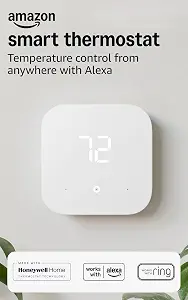
Best Budget is the supplied editorial label for the Amazon Smart Thermostat. It is not a statement about a current price, discount, or how it compares on cost. The choice instead highlights its Alexa and Ring compatibility, app-guided installation, and temperature routines for home, away, and sleep. Those features give an Alexa-oriented shopper concrete reasons to consider it while comparing the options here. For Black Friday, check the exact product and offer rather than reading the label as a promise of a particular deal.
The thermostat requires a C wire, so start by confirming that your system and wiring meet that requirement. If they do, the Alexa app guides you through installation. The product is made with Honeywell Home Thermostat Technology. These details may help shape your planning, but they do not establish compatibility with every HVAC system or guarantee a particular installation experience. If you are uncertain about your wiring, resolve that question before making the purchase decision instead of relying on an event listing or the product name alone.
For daily control, Alexa can automatically switch between your preferred home, away, and sleep temperatures. You can also set the thermostat yourself from anywhere with the Alexa app. Those options suit different moments: a routine can handle the specified temperature transitions, while remote app control lets you make a change yourself. The product can use select Echo devices or an Amazon Smart Air Quality Monitor to automatically adjust heating and cooling based on temperature readings or presence detection. The wording matters: the feature refers to select Echo devices or that monitor, not every connected device. During Black Friday comparisons, weigh those Alexa-linked options against the required C wire and your existing control preferences. This is the guide’s Best Budget pick as an editorial designation, with no claim about its sale price or comparative cost.
Key specs
Compatibility
Works with Alexa and Ring
Wiring
C-wire required
Temperature control
Alexa can automatically switch between your preferred home, away, and sleep temperatures.
Remote control
set it yourself from anywhere with the Alexa app.
Installation
The Alexa app will guide you through the installation process
Technology
Made with Honeywell Home Thermostat Technology
Comfort zones
using select Echo devices or Amazon Smart Air Quality Monitor to automatically adjust heating and cooling based on temperature readings or presence detection.
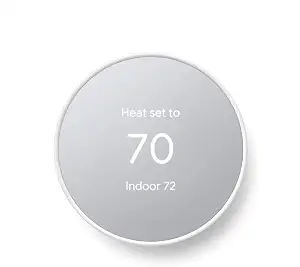
Best Overall is the editorial choice for the Google Nest Thermostat – Snow because its supplied features cover several everyday decision points: programming a schedule in the Google Home app, changing the temperature remotely, and checking C-wire needs before planning installation. That combination makes it a practical starting point for a shopper who wants app-based routines as well as household access away from home. It is a recommendation among the products in this guide, not a claim of measured superiority. During Black Friday, compare the exact Nest listing and variant rather than assuming every offer represents the same setup.
A household can program an energy-efficient schedule in the Google Home app on an Android or iPhone. Family members can also change the thermostat temperature remotely from a phone, laptop, or tablet. For example, someone reviewing the home’s plans while away can use that remote-control option to adjust the setting; the product information does not specify further automation or remote-control conditions, so avoid assuming how those work. The thermostat connects over Wi-Fi and is compatible with Google Assistant and all Matter-certified voice assistants. Voice control requires a compatible smart device, a useful detail to check if spoken commands are part of your intended routine.
Wiring deserves an early look. The Nest Thermostat is designed to work without a C wire in most homes, but some systems—including heating-only, cooling-only, zone-controlled, and heat-pump systems—need a C wire or another compatible power accessory. That qualification makes it important to identify your equipment before treating the no-C-wire design as a guarantee for your home. If a Black Friday listing catches your eye, verify that it is the Google Nest Thermostat – Snow and review the product details for the specific offer. Choose this recommendation if its scheduling, remote access, and assistant compatibility align with your household, while treating wiring compatibility as a separate check.
Key specs
Scheduling
easily program an energy efficient schedule in the Google home app on your Android or iPhone
Remote control
Remote control lets family members change the thermostat temperature from anywhere on a phone, laptop, or tablet[1]
C-wire compatibility
The Nest Thermostat is designed to work without a C wire in most homes, but for some systems, including heating only, cooling only, zone controlled, and heat pump systems, you’ll need a C wire or other compatible power accessory.
Voice assistant compatibility
Compatible with Google Assistant and all Matter-certified voice assistants.
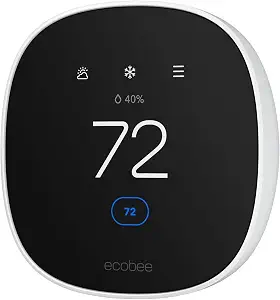
Best for Multi-Ecosystem Households is the editorial label for the ecobee Smart Thermostat Essential. Its stated compatibility with Apple HomeKit, Google Assistant, and Alexa gives shoppers in mixed-platform homes a clear reason to put it on their shortlist. That label describes why it may fit this kind of household; it does not claim that it outperforms other thermostats. While browsing Black Friday offers, make sure the listing is for the Smart Thermostat Essential and compare its included product details with the setup you intend to use.
The thermostat connects over Wi-Fi and has an LCD screen with a listed size of 3.74 inches. It works with most 24 VAC HVAC equipment, including gas, oil, electric, dual-fuel, and forced-air systems, as well as the listed conventional, heat-pump, and boiler configurations. The qualification “most” matters: use the stated compatibility details to check your own equipment rather than treating the list as a fit guarantee for every installation. For homes without a C wire, ecobee identifies its Power Extender Kit, or PEK, as an option. Confirm what the exact offer provides and whether the equipment and wiring arrangement suit your home.
Its built-in eco+ features include indoor humidity detection, a schedule assistant, and time-of-use functionality that preheats or precools the home when energy is less expensive, with the stated aim of reducing use during peak hours. If room-by-room readings matter to your decision, an optional SmartSensor reads temperature and movement in the room where it is placed. The SmartSensor two-pack is sold separately, so include that distinction when comparing a Black Friday offer with your planned setup. These features may be useful to shoppers balancing routines, changing energy costs, and interest in readings from a particular room. Consider which functions you would actually use, then check the exact product variant and any separate components before deciding.
Key specs
Connectivity
Connectivity Technology Wi-Fi
Display
LCD Screen Size 3.74 inches
Smart home compatibility
Works with leading smart home ecosystems. Pair Smart Thermostat Essential with Apple HomeKit, Google Assistant, and Alexa
HVAC compatibility
Works with most 24 VAC HVAC equipment: Gas, oil, electric, dual fuel, forced air Conventional (2H/1C or 1H/2C) Heat Pump (2H/1C) Boilers.
C-wire option
No C Wire, no problem. Get the ecobee Power Extender Kit (PEK) for homes without a C-Wire
Additional features
Built in eco+ Smart Features: Indoor humidity detection, schedule assistant, time of use which preheats or precools your home when energy is less expensive to reduce energy use during peak hours
Optional sensor
Add in a SmartSensor which allows you to measure the temperature in rooms that matter most. It reads temperature and movement in whatever room it is placed in for complete home monitoring and energy savings (SmartSensor 2 pack sold separately)
Map your HVAC setup before browsing
Start with the equipment the thermostat must control, not with a sale headline. Write down the type of heating and cooling system in your home and check its wiring, including whether a C wire is available. The Amazon Smart Thermostat requires a C wire. The Nest Thermostat is designed to work without one in most homes, but certain system types—including heating-only, cooling-only, zone-controlled, and heat-pump systems—need a C wire or another compatible power accessory. Ecobee says its model works with most 24 VAC HVAC equipment and identifies a Power Extender Kit as an option for homes without a C wire. Each statement has a qualification; none should be stretched into a promise that a thermostat will work with every system.
If you cannot identify your wiring or equipment, pause and verify those details before choosing a model. A product listing can help you compare stated compatibility, but it cannot establish your home’s configuration from the information provided here. During Black Friday, this check is especially useful before a time-sensitive purchase decision: an attractive offer is not a substitute for confirming fit. Keep notes on the exact model and the relevant compatibility language as you compare. That turns the first decision into a practical filter and helps prevent features such as app control or scheduling from distracting you from a basic installation requirement.
Choose the control route your household prefers
Think about who will adjust the temperature and which app or assistant they already use. The Amazon Smart Thermostat works with Alexa and Ring, and its temperature controls include automatic changes among preferred home, away, and sleep temperatures. The Nest Thermostat offers remote changes from a phone, laptop, or tablet, and compatibility with Google Assistant and all Matter-certified voice assistants; voice control requires a compatible smart device. Ecobee lists Apple HomeKit, Google Assistant, and Alexa compatibility. These are distinct ways to approach household control, rather than a reason to assume one system is best for everyone.
Picture a normal day: one person may prefer to manage settings in an app, while another may care more about a familiar voice assistant or a schedule that runs without frequent manual adjustments. Match the stated features to those habits, and check which compatible devices you already intend to use. For the Amazon model’s automatic adjustment feature, the supplied details specify select Echo devices or an Amazon Smart Air Quality Monitor. For Nest voice control, a compatible smart device is required. For ecobee, consider the named ecosystem support alongside the features you want. A Black Friday offer is easier to evaluate once you know which control route matters to your household, rather than choosing from brand recognition alone.
Decide what should happen automatically
Thermostat automation can mean a set schedule, a routine tied to preferred temperatures, or adjustments informed by readings and presence. Consider which of those approaches fits your household before paying attention to a feature list. Nest lets you program an energy-efficient schedule in the Google Home app. The Amazon model can switch automatically between preferred home, away, and sleep temperatures, and it also offers automatic adjustments based on temperature readings or presence detection when used with select Echo devices or the Amazon Smart Air Quality Monitor. Ecobee includes a schedule assistant and time-of-use functionality that preheats or precools the home when energy is less expensive.
Those descriptions do not make the products interchangeable. Ask whether you want to set a schedule, make occasional changes yourself, or explore the specific sensing and timing options listed for a model. Ecobee also includes indoor humidity detection; its optional SmartSensor can read temperature and movement in the room where it is placed. That sensor is sold separately, so do not treat it as part of the thermostat offer unless the exact listing says so. On Black Friday, compare automation features with your real routine, not with an imagined promise of automatic savings or comfort. The provided details describe functions, not guaranteed outcomes in a particular home.
Plan the app, installation, and any extra pieces
A thermostat decision includes more than the control unit. The Amazon Smart Thermostat’s Alexa app guides the installation process, while the Nest schedule is programmed through the Google Home app on Android or iPhone. Ecobee’s supplied features include Wi-Fi connectivity and the option of a Power Extender Kit for homes without a C wire. These points help you plan how you may interact with each model, but they do not specify every installation step or confirm what a particular offer includes. If you need help assessing your system, settle that question before checkout rather than assuming a guided app resolves every wiring concern.
Make a short list of what you expect to use: an app, compatible smart-home devices, or a separately sold room sensor. For ecobee, the SmartSensor two-pack is sold separately. For Amazon’s automatic heating and cooling adjustments, the stated options are select Echo devices or the Amazon Smart Air Quality Monitor. For Nest voice control, a compatible smart device is required. Verify whether any item you want is already in your home or included in the exact offer; do not infer inclusion from a feature description or product photograph. This practical inventory is useful when Black Friday listings differ in presentation, because it keeps the comparison focused on the setup you actually intend to have.
Read the Black Friday offer as a specific listing
Treat a Black Friday deal as an offer to verify, not proof that a thermostat is right for you. First check the product name and variant: this guide covers the Amazon Smart Thermostat, Google Nest Thermostat – Snow, and ecobee Smart Thermostat Essential. Then compare the exact offer details with the wiring, HVAC compatibility, app, assistant, and any additional components you have already identified as relevant. Do not assume that a displayed promotion applies to every variant, or that an accessory mentioned in a feature description is bundled with the thermostat.
Keep your comparison grounded in information that the listing actually provides. The product details here do not establish sale prices, discount amounts, stock, seller policies, or whether a specific promotion is active. Accordingly, focus on confirming the exact item and stated setup details rather than inferring value from a deal label. If two options both look appealing, return to the needs that distinguish them: Alexa and Ring compatibility plus a required C wire for Amazon; Nest scheduling and qualified C-wire flexibility; or ecobee’s stated ecosystem support and optional room sensor. A careful Black Friday decision is one you can explain in terms of fit and intended use, not urgency.
Make your Black Friday choice
The most useful shortlist begins with your HVAC equipment and wiring, then narrows by the app, assistant, and type of automation your household will use. The Nest is the guide’s Best Overall choice, Amazon’s model carries the supplied Best Budget label, and ecobee is Best for Multi-Ecosystem Households; these are editorial distinctions among the listed options. Before acting on a Black Friday offer, verify the exact model and any separate components you need. Choose the thermostat whose documented requirements and features line up with your home, rather than letting the event determine the fit.