WOLFBOX G840S 12″ 4K Mirror Dash Cam Backup Camera with 32GB Card and GPS (ASIN B0811Q28N6)
Best Dash Cam Buying Guide — Black Friday Deals 2026
A dash cam choice is really a choice about what you want to capture, how you will get a clip back, and what setup you are willing to manage. These picks serve different routines: the ROVE pairs front and rear recording with GPS and included storage, Garmin keeps the stated video resolution at 1080p HD and adds voice control, while WOLFBOX combines front and rear cameras with a large mirror display. Black Friday can make it tempting to focus on a headline offer, but the useful comparison is the exact model and package in the listing. Consider the camera arrangement, included card, phone access, and any power or subscription conditions before deciding which one fits your driving.
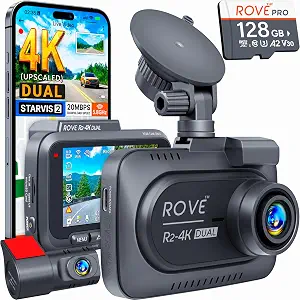
ROVE R2-4K Dual Dash Cam Front and Rear (ASIN B0D6J5B98H)
Best Overall is an editorial choice among these featured cameras, not a claim of measured superiority. The ROVE R2-4K Dual Dash Cam makes a strong all-around fit for someone who wants both forward and rearward recording in one setup. Its front camera captures at 2.5K (QHD) and intelligently upscales to 4K (2160P), while the rear camera records at Full HD 1080P. That distinction is worth keeping in mind when comparing listings: the front and rear cameras have different stated recording resolutions. The Sony STARVIS 2 IMX675 5MP image sensor is another specific part of the package, but shoppers should weigh the complete camera arrangement rather than choosing by a single spec.
For a driver who expects to retrieve footage on a phone, the ROVE can download recorded videos directly to a smartphone over Wi-Fi at up to 20 MB/sec. Built-in GPS adds location data capability to the setup, and a free 128GB microSD card is included. That combination may suit someone who would rather begin with a card in the package and wants phone access for reviewing or sharing a recording. It is still sensible to decide how often you expect to move clips and whether you want GPS before comparing this bundle with simpler recording arrangements. Those details matter more than treating the words “4K” as a complete description of the camera.
Parking mode needs a separate decision: a hardwire kit is required, and it is not included with the package. If you want the camera operating for parked-car monitoring, include that extra setup requirement when assessing the Black Friday offer; do not assume the listed bundle alone provides it. A driver who mainly wants recording during ordinary trips may consider the requirement differently from someone who specifically wants parking mode. Best Overall here reflects the mix of front and rear recording, phone downloads, GPS, and included memory, while leaving room for shoppers to decide whether the required parking accessory fits their plans. Black Friday comparisons should therefore include the exact package, not just its front-camera headline.
Key specs
Front recording
front camera captures at 2.5K (QHD) and intelligently upscales to 4K (2160P)
Rear recording
the rear camera records at Full HD 1080P
Image sensor
Sony STARVIS 2 IMX675 5MP image sensor
Wi-Fi downloads
download your recorded videos directly to your smartphone at up to 20 MB/sec
GPS
comes with built-in GPS
Included memory card
free 128GB microSD card
Parking mode
A hardwire kit is required (not included with the package).
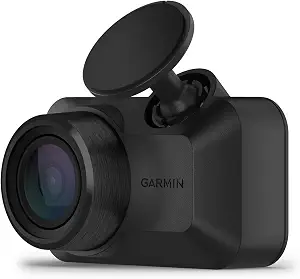
Best Budget is the assigned editorial label among these picks, not a statement about its current price or a promised Black Friday discount. The Garmin Dash Cam Mini 3 may suit a shopper who wants to prioritize its stated 1080p HD recording and wide 140-degree field of view. Garmin says the view captures details in bright and low light, and the camera automatically records and saves incident video with the date and time. That incident-saving behavior is useful to consider if your main goal is to retain relevant events without making every drive about manually managing recordings. Compare those stated functions with what you personally want to capture, rather than assuming that a budget label means a particular feature set.
A built-in Garmin Clarity polarizer lens reduces windshield glare to clearly show important video details. Voice control lets you use spoken commands to save video and start or stop audio recording; supported languages are English, German, French, Spanish, Italian, and Swedish. These controls may appeal if you want to save a clip by voice instead of reaching for the camera, while shoppers who do not expect to use voice commands may give that feature less weight. As you compare Black Friday listings, check that the product name and selected variant are the Mini 3 before drawing conclusions from a deal page or another Garmin camera.
The online Vault automatically stores important saved clips for viewing and sharing in the Garmin Drive smartphone app. Vault features such as dash cam live view require a paid Vault subscription and an active Wi-Fi network connection; without a paid subscription, users can view and download files only when near the dash cam. Parking Guard can send a phone notification if an incident is detected, but that also requires a paid Vault subscription, active Wi-Fi, constant power, and the Garmin Drive app on a compatible smartphone. Those conditions are significant when deciding whether the service or parking notification is useful to you. Garmin says the camera is designed for harsh vehicle environments, including direct sunlight and hot car interior temperatures. Best Budget is therefore a label for this selection, not a substitute for checking service needs and the exact Black Friday offer.
Key specs
Video
records crisp 1080p HD video, and a wide 140-degree field of view captures details in bright and low light
Incident recording
automatically records and saves video of incidents with date and time
Lens
Built-in Garmin Clarity polarizer lens reduces windshield glare to clearly show important video details
Voice control
Voice control lets you use spoken commands to save video and start or stop audio recording (available in English, German, French, Spanish, Italian and Swedish)
Video storage
the online Vault, which automatically stores important saved video clips so you can view and share with the Garmin Drive smartphone app; you can even access high-end features, such as dash cam live view (requires a paid Vault subscription and active Wi-Fi network connection; nonpaid users can only view and download files when near the dash cam)
Parking notifications
the parking guard feature sends a notification to your phone if an incident is detected (requires a paid Vault subscription, active Wi-Fi connection, constant power and use of the Garmin Drive app on your compatible smartphone)
Operating environment
Designed to withstand harsh vehicle environments, including direct sunlight and hot car interior temperatures
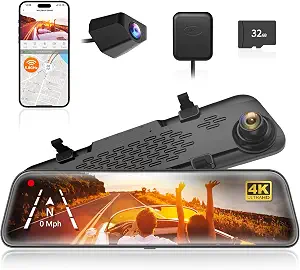
WOLFBOX G840S 12″ 4K Mirror Dash Cam Backup Camera with 32GB Card and GPS
WOLFBOX G840S 12″ 4K Mirror Dash Cam Backup Camera with 32GB Card and GPS (ASIN B0811Q28N6)
Best for a Large Mirror Display is an editorial label based on a distinctive stated feature: the WOLFBOX G840S has a 12″ display. That makes it a natural option to consider if you specifically want a large mirror-style screen as part of the dash-cam setup. Its front camera records at 4K UHD (2160p), paired with a 1080p rear camera. The front lens has a 170° field of view and the rear lens has a 140° field of view. Those specifications describe different parts of the system, so compare them with the coverage you want rather than treating the display size as a stand-in for camera performance.
The included external GPS antenna enables real-time GPS data display directly on the dash cam. The camera can also connect to a phone over Wi-Fi using the WOLFBOX app on iOS or Android devices. If you like the idea of seeing GPS data on the camera and using an app connection, these are relevant package details to weigh alongside the mirror display. The included card is a 32GB card in the dash cam card slot. A shopper who values having memory included can compare that specific card with the storage arrangements on the other featured models, while also considering what they expect to keep or retrieve.
The parking monitor requires a hardwire kit, so include that requirement in your plan if parked-car monitoring is important. It is a separate setup consideration from the screen, GPS antenna, Wi-Fi connection, and card listed with the camera. For Black Friday, verify the exact G840S package and included components in the offer you are considering; do not infer that an accessory is bundled just because the camera supports a feature requiring it. This model’s editorial label is about its large display, not a claim that every driver will prefer a mirror-style setup. It is a fit to investigate when the screen itself is a priority, and a less direct match if you are choosing mainly by phone access, memory-card size, or the need to plan a hardwire installation.
Key specs
Front and rear resolution
front camera’s upgrade to 4K UHD (2160p) resolution, paired with a 1080p rear camera.
Lens field of view
a 170° front lens and a 140° rear lens
GPS
The included external GPS antenna enables real-time GPS data display directly on the dash cam.
Wi-Fi
Connect to your phone via Wi-Fi and use the “WOLFBOX” app on iOS or Android devices
Included memory card
32GB Card(in the dash cam card slot)
Parking monitor
A hardwire kit is required for parking monitoring.
Display
Size 12
Choose the camera layout around the drive you make
Start by picturing the recording you would want to review after an unexpected event. The ROVE and WOLFBOX both specify front and rear cameras, with separate stated resolutions for each view. The Garmin listing describes 1080p HD video and a 140-degree field of view. That gives shoppers different arrangements to compare: paired front-and-rear recording, or a camera whose listed appeal centers on its front view, incident saving, and controls. This is not a judgment that one layout suits everyone. A driver who wants both ends of the car represented may favor comparing the dual-camera packages first; someone focused on the Garmin’s listed recording and incident features may begin there instead.
Think about your regular routes as well as occasional trips. If you often want to review more than the forward view, a product with a stated rear camera deserves close attention, but remember that its front and rear specifications are not identical. If you value a wide stated field of view, compare the precise lens angles listed for each model and decide which camera’s view matters to you. During Black Friday, keep the selected variant and camera arrangement visible while comparing offers. A lower-looking headline is not useful if the listing is for a different configuration than the one you meant to consider.
Black Friday: compare the package, not just the headline
A Black Friday offer is easiest to assess when you treat the listing as a complete configuration. Check the exact product name, camera arrangement, included card, and any named accessory before deciding whether the offer matches your needs. The ROVE package specifies a free 128GB microSD card; WOLFBOX lists a 32GB card in the dash cam card slot. Those are concrete package details, but they do not by themselves determine which setup is right for you. Consider whether included memory is important and whether the camera’s other features fit your routine.
Also separate what the camera can do from what the package includes. Both ROVE and WOLFBOX specify a hardwire kit requirement for their parking functions, and the ROVE package explicitly says that kit is not included. Garmin’s Vault and Parking Guard features have subscription, Wi-Fi, app, or power conditions described in its listing. Before checkout, read the details attached to the exact Black Friday selection rather than assuming a headline applies to every variant or includes every accessory. No discount needs to be assumed to make this comparison useful: the goal is to understand the setup you would actually be choosing.
Decide whether a mirror display suits your cabin
The WOLFBOX is the only featured product with a stated 12″ display, so it is the clear candidate to examine if a large mirror-style screen is central to your preference. Consider whether you want GPS data displayed directly on the dash cam, which the included external GPS antenna enables, and whether you expect to use its Wi-Fi connection with the WOLFBOX app on an iOS or Android device. These are different ways of engaging with the camera: on-device display, phone connection, and recorded views. Give priority to the ones you can see yourself using rather than counting every listed feature equally.
A larger display may not be the deciding factor for someone who mainly wants to retrieve clips on a phone or issue spoken commands. ROVE specifies direct smartphone downloads over Wi-Fi at up to 20 MB/sec, while Garmin offers voice control for saving video and starting or stopping audio recording. Those details address different everyday preferences, not a universal ranking. When reading Black Friday listings, check that the display or control feature you care about belongs to the exact model and package shown. Choose a setup around how you expect to interact with it, not an assumption that a screen, app, or voice feature will matter equally to every driver.
Follow a saved clip from camera to phone
It helps to think through the whole path of a recording: how it is saved, where it is stored, and how you would access it later. Garmin automatically records and saves video of incidents with the date and time. Its online Vault stores important saved clips for viewing and sharing through the Garmin Drive app, but live view and other high-end features require a paid Vault subscription and active Wi-Fi. Nonpaid users can view and download files only when near the dash cam. If you are considering those online features, weigh the stated conditions rather than treating them as a standard part of every use.
ROVE specifies direct Wi-Fi downloads to a smartphone at up to 20 MB/sec, and WOLFBOX specifies a Wi-Fi connection through its app. Their included cards are different, so consider the supplied storage as part of your decision too. GPS is another separate question: ROVE has built-in GPS, while WOLFBOX’s included external antenna enables real-time GPS data display directly on the dash cam. A driver who wants location information should compare these descriptions closely. Black Friday may put several convenient-sounding features in view at once; map each one to the way you would actually find and keep a clip before letting it influence the choice.
Plan power before relying on parked-car features
Parking-related functions deserve their own setup check, because their requirements differ. ROVE says parking mode requires a hardwire kit that is not included. WOLFBOX says a hardwire kit is required for parking monitoring. If you are interested in either function, decide whether arranging the required kit is part of your plan and account for it when evaluating the listing. A camera’s stated driving features and its parking setup are not interchangeable considerations; a shopper who mainly wants recording on regular trips may weigh this requirement differently from someone focused on monitoring a parked vehicle.
Garmin’s Parking Guard notification has its own conditions: a paid Vault subscription, active Wi-Fi connection, constant power, and use of the Garmin Drive app on a compatible smartphone. That is a different set of dependencies from a hardwire-kit requirement, so do not assume the products’ parking features work in the same way. When considering a Black Friday offer, make a short list of the power and service requirements that apply to the model you selected. Then decide whether the additional setup suits your circumstances. This keeps a parking feature from seeming simpler or more complete than the details provided actually establish.
Make your Black Friday choice
The right dash cam depends on what you want to record and how you expect to use the footage afterward. Choose ROVE if its front-and-rear arrangement, built-in GPS, phone downloads, and included 128GB card match your priorities, while remembering the parking-mode kit requirement. Consider Garmin for its 1080p HD recording, incident saving, glare-reducing lens, and voice control, after weighing its Vault conditions. Look at WOLFBOX if the 12″ display and its specified front-and-rear setup appeal to you, and plan for the parking-monitor kit if needed. This Black Friday, compare exact configurations and requirements before deciding; a headline alone cannot tell you whether the package fits your routine.