Best Graphics Buying Guide — Black Friday Deals 2026
A graphics-card shortlist is most useful when it starts with the job you need the card to do, then checks the model’s listed memory, features, connections, size and power requirements. This guide covers three different directions: the ASRock Radeon RX 9070 Challenger 16GB OC as Best Overall, the ASRock Radeon RX 7600 Challenger Pro 8GB OC as Best Budget, and the ASUS Dual NVIDIA GeForce RTX 5060 8GB GDDR7 OC Edition as Best for DLSS 4 Upscaling. Those labels are editorial choices among these options, not claims based on testing. During Black Friday, compare the exact model and variant shown in the offer with the specifications here. A headline alone cannot tell you whether a card suits your system or priorities.
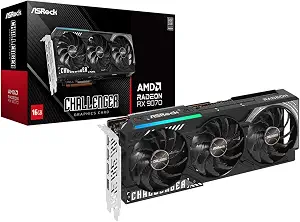
Best Overall: ASRock Radeon RX 9070 Challenger 16GB OC Graphics Card. Its listed combination of RDNA 4 architecture, 56 CUs and 3584 stream processors gives shoppers concrete details to use when comparing it with the other cards in this guide. The card has 16GB of GDDR6 memory on a 256-Bit Bus, with memory speed listed at 20 Gbps. These specifications describe the hardware, but they do not establish how a particular game or application will perform. For a shopper who wants a higher-capacity memory configuration among these three options, the stated 16GB is a clear point of distinction.
The clock specifications are a boost clock up to 2520 MHz and a game clock of 2070 MHz. Read the “up to” qualification as part of the boost figure rather than as a promised operating speed in every situation. The PCIe 5.0 interface is another listed detail to verify against the rest of your planned build. This card’s overall label reflects its broad set of stated specifications in this selection; it is not a measured performance verdict or a guarantee that it is the right choice for every graphics workload.
For a Black Friday comparison, check the offer’s product identity carefully and make sure it is this RX 9070 Challenger 16GB OC rather than another card with a similar family name. Physical planning matters too: ASRock lists a 2.5-slot card measuring 290x123x51mm, two 8-pin power connectors and a recommended 700W PSU. Compare those exact requirements with your case and power-supply information before deciding. If the available listing confirms the model and these details suit your build, its memory capacity and architecture give you a well-defined basis for considering it. The Best Overall label is a useful shortlist guide, not a substitute for those checks.
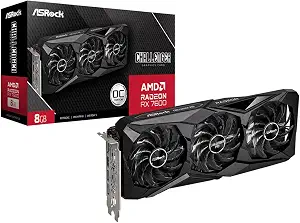
ASRock Radeon RX 7600 Challenger Pro 8GB OC (ASIN B0G6FCDZMK)
Best Budget: ASRock Radeon RX 7600 Challenger Pro 8GB OC. The card is specified with 8GB of GDDR6 memory on a 128-bit interface running at 18 Gbps. Its listed clocks are a max boost clock of up to 2695 MHz and a game clock of 2280 MHz. These figures let you compare the card’s stated configuration with your own priorities, but they do not predict frame rates or establish how it will handle a particular title. The Best Budget label identifies its role in this three-card guide; it does not imply a current low price or a Black Friday discount.
A practical distinguishing detail is the listed 0dB Silent Cooling feature, which stops the fans completely under low temperatures. Treat that wording narrowly: it describes fan behavior under the stated condition, not silence in every use or a particular noise level. For displays, the card includes three DisplayPort 1.4a connections with DSC and one HDMI 2.1 port. If those are relevant to your desk, check that the connection types match your display plan. Its PCI Express 4.0 x8 interface is described as compatible with PCIe 4.0 and 3.0 motherboards, which is a specific compatibility statement to compare with your system details.
Before a Black Friday purchase, distinguish this Challenger Pro 8GB OC from other RX 7600 listings and verify the complete model name. Its stated physical requirements are a 2.5-slot card measuring 303 mm (L) x 131 mm (W) x 45 mm (H), a single 8-pin power connector and a recommended 550W power supply. Check those figures against your own case and power setup rather than assuming that a card’s family name establishes fit. The budget-oriented label can help narrow the shortlist if you want to compare this option, but the actual offer and your build requirements should determine whether it belongs in your final choice.
Key specs
Memory
8GB of GDDR6 memory on a 128‑bit interface running at 18 Gbps
Clock speeds
a max boost clock of up to 2695 MHz, a game clock of 2280 MHz
Power requirements
requires a single 8‑pin power connector and a recommended 550W power supply
Dimensions
2.5‑slot card measuring 303 mm (L) x 131 mm (W) x 45 mm (H)
Cooling
0dB Silent Cooling stops fans completely under low temperatures
Display connections
Includes three DisplayPort 1.4a with DSC and one HDMI 2.1 port
Interface
PCI Express 4.0 x8 interface (compatible with PCIe 4.0 and 3.0 motherboards)
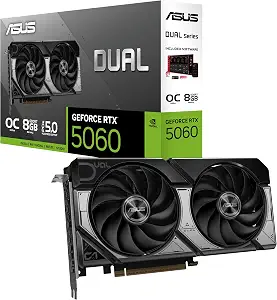
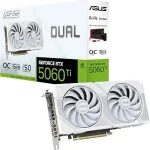
ASUS Dual NVIDIA GeForce RTX 5060 8GB GDDR7 OC Edition
Best for DLSS 4 Upscaling: ASUS Dual NVIDIA GeForce RTX 5060 8GB GDDR7 OC Edition. DLSS 4 is the named upscaling feature in the supplied specifications, making it the clearest reason to put this card on a shortlist built around that feature. The card has 8GB of GDDR7 memory and a PCIe 5.0 interface. Those details help identify its configuration, but the information here does not establish results in specific games, supported settings or the experience you should expect. The label is an editorial way to distinguish this card by a listed feature, not a claim of measured superiority.
ASUS lists OC mode clock speed as 2565 MHz and Default mode as 2535 MHz. Its video outputs are Native DisplayPort 2.1b x3 and Native HDMI 2.1b. Check the ports against the displays you plan to connect, and consider the exact output versions rather than relying only on the number of connections. The 2.5-Slot Design is also relevant when checking space in a build. The card’s Axial-tech fan design is described as using a smaller fan hub to facilitate longer blades and a barrier ring that increases downward air pressure. That description names design elements; it does not by itself establish a particular temperature or noise outcome.
On Black Friday, make sure the offer refers to the ASUS Dual RTX 5060 8GB GDDR7 OC Edition and not a different RTX 5060 variant. Compare the listed DLSS 4 feature, memory type, output connections and OC/default clock details with what you actually value. The supplied information does not include this card’s dimensions or power requirements, so use the exact listing and relevant system information to confirm those points before buying. The feature-based label gives you a starting point if DLSS 4 is a priority, while the remaining checks keep that priority in perspective.
Key specs
Memory
8GB GDDR7
Interface
PCIe 5.0
Upscaling
DLSS 4
Video outputs
Native DisplayPort 2.1b x3, Native HDMI 2.1b
Design
2.5-Slot Design
Fan design
Axial-tech fan design features a smaller fan hub that facilitates longer blades and a barrier ring that increases downward air pressure
Start by writing down what you want the graphics card to support: the games or creative applications you use, the displays you intend to connect, and any named features you specifically want. This is not a way to predict performance from a specification sheet; it is a way to decide which facts deserve your attention. For example, shoppers interested in DLSS 4 can put the ASUS RTX 5060 on their shortlist because that feature is explicitly listed. Someone placing more weight on memory capacity can note the RX 9070’s 16GB GDDR6 configuration. If low-temperature fan behavior matters, the RX 7600 listing describes 0dB Silent Cooling, with the qualification that its fans stop under low temperatures.
Then separate requirements from preferences. A port that matches your display plan or a power connector your system can supply may be a practical requirement. A preferred architecture or named feature may help distinguish otherwise plausible choices. During Black Friday, this simple separation can prevent a tempting offer headline from doing the decision-making for you. Keep the exact product name beside each priority, and remove any option that cannot be confirmed to meet a must-have. Leave uncertain points marked for checking instead of filling them in from assumptions. This produces a shortlist based on your setup and the supplied facts, rather than on a broad promise about what a card will do.
Treat memory details as configuration, not a performance forecast
The cards here list different memory configurations: the RX 9070 has 16GB of GDDR6 on a 256-Bit Bus and 20 Gbps memory speed; the RX 7600 has 8GB of GDDR6 on a 128-bit interface running at 18 Gbps; and the RTX 5060 has 8GB of GDDR7. These are useful identification and comparison points. They do not, by themselves, tell you how a specific game, application, resolution or setting will behave. Avoid turning a larger capacity, a bus width or a memory type into an unsupported promise about speed or suitability.
Consider which listed detail answers a real question for you. If you are comparing configurations for a workload with known memory needs, consult the application’s requirements separately; those requirements are not included here. If you are simply comparing this shortlist, record the supplied memory facts without adding assumptions. The clock figures also deserve careful reading: the RX 9070 boost is specified as up to 2520 MHz, while its game clock is 2070 MHz; the RX 7600 lists a max boost up to 2695 MHz and a game clock of 2280 MHz; ASUS lists separate OC and Default mode clocks. A Black Friday listing should match the exact card before you use any of those details in your decision.
Check the build’s physical and electrical limits
A card can be attractive on paper and still require a closer fit check. ASRock lists the RX 9070 as a 2.5-slot card measuring 290x123x51mm, with two 8-pin power connectors and a recommended 700W PSU. The RX 7600 is also 2.5-slot, measuring 303 mm (L) x 131 mm (W) x 45 mm (H); its stated power requirements are a single 8-pin connector and a recommended 550W power supply. Use the dimensions and power details as separate checks. Confirm your case clearance using the exact card measurements, and compare the listed connector and PSU information with your own system.
The supplied facts describe the ASUS RTX 5060 as a 2.5-Slot Design but do not provide dimensions or power requirements. That is a prompt to verify those details for the exact model rather than to assume them from another RTX card. The same careful approach applies during Black Friday: confirm the product variant first, then assess fit and power using information for that variant. Do not infer that two cards with similar names share dimensions, connectors or requirements. A simple checklist can help: exact model, available case space, slot layout, required power connection and the relevant PSU recommendation where one is provided. If a point remains unknown, resolve it before purchase.
Make the display connections part of the shortlist
Think through the displays and cables you expect to use, then match their requirements to the card’s listed outputs. The RX 7600 includes three DisplayPort 1.4a connections with DSC and one HDMI 2.1 port. The RTX 5060 lists Native DisplayPort 2.1b x3 and Native HDMI 2.1b. Those exact connection names can help distinguish the options, but the supplied information does not explain every display capability or guarantee compatibility with an individual monitor. Check the display documentation for the connection it requires and whether any other conditions apply.
No video-output details are provided for the RX 9070 in these records, so do not assume them based on the product family or another card. Confirm its outputs from the exact listing if they matter to your setup. Also consider how many displays you plan to connect and what connection types are already in use; the card descriptions here provide output counts for two models but do not describe your other equipment. During Black Friday, product pages and offer titles can emphasize a model family while omitting a variant distinction in the headline. Recheck the full model identity and output information before treating a listing as a match. This keeps the port decision grounded in the devices you actually intend to connect.
Use Black Friday offers as a final verification step
A seasonal offer is a reason to compare carefully, not a reason to skip the specification checks. Confirm that the product page names the card you selected: RX 9070 Challenger 16GB OC, RX 7600 Challenger Pro 8GB OC, or ASUS Dual RTX 5060 8GB GDDR7 OC Edition. Then compare the stated features that drove your choice. That might mean the RX 9070’s memory and RDNA 4 details, the RX 7600’s listed silent-cooling behavior and connections, or the RTX 5060’s DLSS 4 designation and output versions. Keep the comparison tied to the exact offer and variant rather than a broad family name.
No active promotion, discount, price, stock status or seller policy is established by the information in this guide. Evaluate any offer using the details shown for that specific listing, and check whether the configuration still suits your build. If the offer page leaves a decision-critical fact unclear, pause and verify it rather than relying on a general description. You can also write down the reasons you shortlisted a card and compare each one against the exact listing before checking out. Black Friday can bring many competing product pages into view; a consistent model-and-feature checklist helps you make a deliberate decision without treating urgency or a headline as evidence of fit or value.
Make your Black Friday choice
The RX 9070, RX 7600 and RTX 5060 offer different sets of listed details, so the strongest choice depends on what your build and intended use require. Use the Best Overall, Best Budget and Best for DLSS 4 Upscaling labels as starting points, not as universal rankings. Confirm the exact model, memory and named features that matter to you, then verify physical fit, power and display connections with your own setup. For Black Friday, compare the specific offer rather than assuming that a seasonal headline identifies the right variant or establishes a saving. A careful match between the card’s documented specifications and your real requirements is more useful than choosing from a label alone.