64GB 15.6″ Frameo Digital Picture Frame WiFi (ASIN B0F8B93ZBM)
Best Digital Photo Frame Buying Guide — Black Friday Deals 2026
A digital photo frame can be a shared family display, a rotating collection for a side table, or a way to keep favorite images visible without choosing prints. Start by deciding where it will sit, how you expect photos to reach it, and whether you want to show video as well as still images. Those choices make the listed specifications more useful than a headline alone. For Black Friday, compare the exact model and variant in each offer: the products here differ in display size, resolution, storage details, and stated sharing or video limits. No deal is worth treating as a fit until those details match your routine.
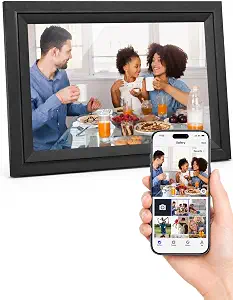
Digital Picture Frame 10.1 Inch WiFi Digital Photo Frame Electronic
Digital Picture Frame 10.1 Inch WiFi Digital Photo Frame Electronic (ASIN B0CYZ7Q53D)
The 10.1 inch IPS LCD panel and 1280*800 resolution give this frame a clear, specific profile for shoppers seeking a compact Wi-Fi photo display. Its 16GB built-in memory is the main stated storage option, and the frame can also play directly from a max 32GB micro SD card. That combination makes it worth considering if you want to keep a collection on the frame while retaining an option for card-based playback. The listing specifies JPG, JPEG, BMP, and PNG pictures, plus MP4 video, so checking your existing files against that list is a practical step before buying.
Phone sharing uses the Uhale Phone App for iOS and Android, and the listed video limit is a maximum of 120 seconds. That makes the model a possible match for someone who wants to send selected pictures from a phone and occasionally include a short clip. If longer videos are central to your plan, treat the stated limit as a real constraint rather than assuming every clip will fit. For a household that mainly wants still images, it may be less important; either way, confirm that the app-based route suits the people who will add content.
This is the Best Budget choice among these featured options as an editorial fit, not a claim about market-wide value or measured performance. Its stated mix of built-in memory, app sharing, and micro SD playback gives shoppers several details to weigh together. The frame can sit on a table or be hung on a wall in portrait or landscape mode, which offers flexibility when deciding where photos will be seen. During Black Friday, verify that the offer is for this exact model and confirm the listed storage, app, video, and placement details before comparing the price with other candidates.
Key specs
Display
10.1 inch IPS LCD panel
Resolution
1280*800
Built-in storage
16GB built-in memory
App sharing
via Uhale Phone App(iOS/Android)
Video limit
videos(Max.120s)
Expandable storage
support to play directly from a max 32GB micro SD card
Placement
on table or hang it on wall in portrait or landscape mode
File formats
Supports picture format by JPG/JPEG/BMP/PNG and video format by MP4.
Aura Digital HD Picture Frame (10″ – Carver Black)
Aura Digital HD Picture Frame (10″ – Carver Black) (ASIN B0GR6YMKHX)
The Aura Digital HD Picture Frame in Carver Black is the Best Overall pick among the products in this guide as an editorial recommendation, not the result of a performance test. Its listed 10.1 inches display, WXGA resolution, Wi-Fi connectivity, touchscreen, and 16:9 aspect ratio provide a straightforward set of considerations for someone who wants a connected frame with touch controls. The black finish is part of the named variant, so check that the offer you are viewing is for Carver Black rather than assuming another finish or model has identical details.
Think about how you expect to interact with a frame before treating the touchscreen as decisive. Touch control may appeal if you prefer interacting at the display, while Wi-Fi is a relevant listed connection detail if connectivity is part of your plan. The available facts do not specify a storage capacity, phone-sharing app, supported file types, or video limit for this model. That is not evidence that a particular capability is missing; it means you should inspect the exact listing for answers if any of those points determine your purchase.
The listed power source is Corded Electric, so placement should include a practical route to power rather than relying on a battery assumption. Consider whether a table or shelf near an outlet suits your room, and review the product information for any placement details you need. Black Friday can make it tempting to focus on the offer headline, but compare the exact Aura model and variant and check the details that matter to your setup. The Best Overall label here simply reflects its combination of listed display, Wi-Fi, and touchscreen features among these choices; it does not promise that it will suit every room or sharing routine.
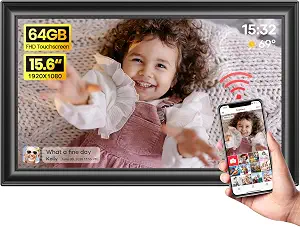
64GB 15.6″ Frameo Digital Picture Frame WiFi (ASIN B0F8B93ZBM)
This 64GB Frameo frame is the Best for a larger Full HD display choice in this guide, based on its stated 15.6″ 1920 x 1080 IPS Full HD display. The larger listed screen may be relevant if you want a prominent display rather than a smaller frame for a close tabletop view. Its built-in 64GB storage is another clear point of distinction for shoppers planning to keep a sizable collection on the device. These specifications do not establish how the frame will look in every room, so consider the viewing distance and available surface before deciding that a larger display is right for your space.
The listing says the frame supports only 2.4GHz Wi-Fi, a detail to check against the network you intend to use. Phone video uploads through the Frameo app are limited to 15-second videos. If short clips are enough for your household, that limit may be acceptable; if you regularly want to share longer moments, account for the restriction before choosing. Supported files include JPG, JPEG, BMP, PNG, and MP4 videos. For removable media, the listing says an SD card or USB drive should be in FAT32 format before use, so check the format requirement rather than assuming a drive will work as-is.
The listed dimensions are approx. 15.43 x 9.61 inch, useful information when checking whether a chosen spot can accommodate the frame. Black Friday shoppers weighing this model against smaller options should balance its Full HD display and built-in storage with the network and clip qualifications. Confirm the exact Frameo model and offer details, including the 2.4GHz Wi-Fi condition and file-format instructions. Its Best for a larger Full HD display label points to a stated configuration, not a guarantee that it is the best choice for every viewer.
Key specs
Wi-Fi
Only supports 2.4GHz Wi-Fi
Phone video uploads
Frameo app only allows uploading 15-second videos
Built-in storage
built-in 64GB storage
Display
1920 x 1080 IPS Full HD display
Storage format
Please make sure the SD card/USB drive is in “FAT32” format before use.
Supported formats
JPG, JPEG, BMP, PNG, and MP4 videos.
Dimensions
approx. 15.43 x 9.61 inch
Picture the frame in its eventual spot
Start with the place you have in mind, not a screen specification in isolation. A frame intended for a side table may need to feel proportionate to nearby objects; one chosen as a more prominent display deserves a check of the available space and viewing distance. The provided products span a 10.1 inch IPS LCD option, an Aura model listed at 10.1 inches, and a 15.6″ display. Those descriptions help set expectations, but they cannot decide which size will feel comfortable in your own room.
Placement details also differ in what is stated. The 10.1 inch Wi-Fi frame can sit on a table or hang on a wall in portrait or landscape mode. The Aura listing specifies a Corded Electric power source, so include power access in your placement decision. For the larger Frameo option, its listed dimensions are approx. 15.43 x 9.61 inch; use that exact information when checking your intended surface. During Black Friday comparisons, note whether the offer is for the model and variant whose placement details you considered. A frame that suits the room and its practical setup is a more useful choice than one selected by screen size alone.
Black Friday: compare what each screen actually offers
Resolution and display size answer different questions, so read both rather than treating either as a complete picture of display suitability. The compact Wi-Fi model lists a 1280*800 resolution and a 10.1 inch IPS LCD panel. The Aura Carver Black is listed with WXGA resolution and a 10.1 inches display. The Frameo model specifies a 1920 x 1080 IPS Full HD display and a 15.6″ screen. These are distinct configurations; the available facts do not establish a universal winner for every image, room, or viewing distance.
Think about the photographs you most often want to see and where people will encounter the frame. If it will be a central visual feature, the larger Full HD option may be worth considering; if a smaller frame better suits the space, compare the two listed 10.1-inch displays and their other features. The Aura also lists a 16:9 aspect ratio and touchscreen, details that may matter to your preferences. For Black Friday, compare the exact model’s display facts with the offer you are considering. Avoid assuming a different variant shares the same configuration, and do not let a headline replace a room-specific decision.
Choose how new pictures will reach the display
The sharing route can shape everyday use as much as the screen. The 10.1 inch Wi-Fi frame specifies sharing through the Uhale Phone App for iOS and Android. The larger Frameo frame specifies phone video uploads through the Frameo app and says it supports only 2.4GHz Wi-Fi. The Aura listing includes Wi-Fi, but the provided details do not identify a sharing app. If app sharing is important, check the exact product listing for the setup information you need instead of inferring a route from connectivity alone.
Consider who will add photos and how often. A frame that will receive occasional additions from a phone calls for a different routine from one where you plan to organize files for playback from removable media. The compact model also specifies direct playback from a max 32GB micro SD card. The Frameo listing includes SD card and USB drive format guidance, requiring FAT32 before use. For Black Friday, make a short checklist of the connection and content path you actually expect to use, then verify that the specific offer aligns with it. That keeps app names, network conditions, and removable-media instructions from getting lost in a price comparison.
Treat memory, file types, and clips as one decision
Capacity alone does not tell you whether a frame fits your collection. The compact model lists 16GB built-in memory and support for direct playback from a max 32GB micro SD card. The Frameo model lists built-in 64GB storage and also provides instructions for SD cards or USB drives: format them as FAT32 before use. The Aura facts supplied here do not state a storage capacity. If capacity matters to you, confirm it for the exact Aura listing rather than guessing from the product name or comparing unlisted details.
Next, check the types of files you want to display. The compact frame lists JPG, JPEG, BMP, and PNG pictures plus MP4 video; the Frameo model lists the same picture extensions and MP4 videos. Their video-sharing details are not the same: the compact frame specifies videos up to 120 seconds, while Frameo app uploads are limited to 15-second videos. Those limits apply to the stated routes, so match the qualification to how you plan to send clips. Black Friday is a useful moment to compare these practical distinctions, but an offer should not distract from a format or limit that conflicts with your existing files.
Black Friday: verify the offer against your short list
Once you have narrowed your choices, check the product name and exact variant shown in the offer rather than relying on a broad category label. For the Aura, that means confirming the Carver Black model if that is the finish you selected. For the other frames, verify the model details that drove your choice: app or Frameo sharing, storage, display, video limit, and any network or removable-media condition. The facts here provide no sale prices or current promotion status, so compare the actual offer details you see without assuming a discount is active.
A helpful comparison note can be simple: record what matters most to you, such as a stated display configuration, a named phone app, built-in storage, video duration, or a placement detail. Then check each point against the exact listing and variant before you decide. Do not assume that a feature omitted from the supplied specifications is either present or absent; investigate it if it is essential. This approach keeps Black Friday shopping focused on the frame you will actually use. If a detail remains unclear, treat that uncertainty as a reason to seek confirmation from the listing before committing, rather than filling the gap with an assumption.
Make your Black Friday choice
The right digital photo frame is the one whose display, content route, and placement make sense for the way you plan to use it. The compact Wi-Fi model spells out app sharing, storage, video duration, and portrait-or-landscape placement; the Aura lists Wi-Fi, touchscreen, WXGA resolution, and corded power; the Frameo model brings a larger Full HD display alongside specific Wi-Fi and clip qualifications. As Black Friday offers appear, verify the exact model and variant and weigh those details against your needs. Compare the offer you actually see, not an assumed promotion, and choose the configuration you can use comfortably.