Best Soundbar Buying Guide — Black Friday Deals 2026
A soundbar can be a straightforward TV add-on or part of a more involved home listening setup, so start by deciding what you want it to do in your room. The choices here range from a dialogue-focused bar to systems with a subwoofer and more specified surround features. For Black Friday, treat the advertised offer as a prompt to check the exact model and included components, not as proof that a particular setup is right for you. Compare the connections, placement needs, controls and formats against your own TV and habits before choosing.
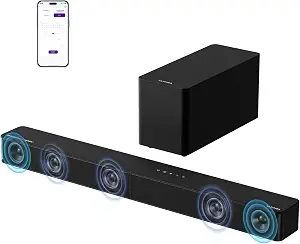
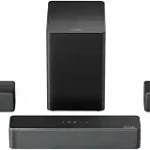
ULTIMEA 5.1CH Surround Sound Bar System with Dolby Atmos, Poseidon M60
ULTIMEA 5.1CH Surround Sound Bar System with Dolby Atmos, Poseidon M60 (ASIN B0F62YBNSX)
Best Overall is an editorial choice for shoppers who want the most specified surround-oriented setup among these options. The ULTIMEA Poseidon M60 is a 5.1-channel system with Dolby Atmos, and the soundbar has five built-in speakers, including two side-firing drivers. Those details make it worth considering if you are comparing a bar-and-subwoofer arrangement with a simpler TV speaker upgrade. They describe the system, not a guaranteed result in every room: your intended placement and listening area still matter when deciding whether its layout suits you.
As you plan where the components will go, account for the included 5.25-inch wired subwoofer with BassMX Technology. Wired means you should consider the connection and cable route as part of the room plan, rather than focusing only on where the bar sits. The system lists up to 300W of peak power; use that figure as a specification to compare, not as a promise of how loud or immersive it will sound in your space. If you are drawn to Dolby Atmos, check that the rest of your planned setup and the content you watch make that format relevant to you.
The listed connections are HDMI eARC, Optical and Bluetooth 5.4. Before a Black Friday purchase, check your TV’s available connection and decide whether you expect to connect another device wirelessly. The app controls include a 10-band graphic EQ, 121 sound presets and 13 adjustable surround levels. That range may appeal if you like having options to tailor sound rather than leaving every setting untouched; it may be more control than you want if your priority is a simple setup. Think about whether you would actually explore those adjustments after installation.
This pick fits a shopper willing to plan around a multi-component system and interested in both specified surround features and adjustable sound. It is not automatically the right choice for every room or routine: compare the physical arrangement, wired subwoofer placement, TV connection and app controls with your own priorities. During Black Friday, verify that the listing is for the Poseidon M60 and compare the exact offer and variant with the setup you intend to buy. The Best Overall label reflects this guide’s editorial selection among these products, not a measured claim that it outperforms every alternative.
Key specs
Audio channels
5.1 Channel with Dolby Atmos
Connectivity
HDMI eARC, Optical, Bluetooth 5.4
Subwoofer
5.25-inch Wired Subwoofer with BassMX Technology
Peak power
up to 300W of peak power
Soundbar speakers
Five built-in speakers, including two side-firing drivers
App controls
a 10-band graphic EQ, 121 sound presets, and 13 adjustable surround levels
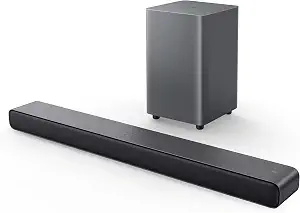
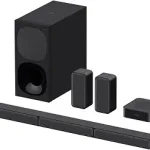
TCL S55H 2.1 Sound Bar with Wireless Subwoofer for Smart TV
TCL S55H 2.1 Sound Bar with Wireless Subwoofer for Smart TV (ASIN B0D1JBBJ6S)
Best Budget is an editorial label for the TCL S55H, not a statement about its current price or an active Black Friday discount. Consider it if you want a soundbar paired with a wireless subwoofer and are weighing a 2.1 setup against a more elaborate surround system. The listed formats are Dolby Atmos, DTS Virtual:X and Surround Sound. Those are useful details to compare with the formats you care about, but they do not establish how the sound will perform in your room or with every program you watch.
The maximum output is listed as 220 watts, and the system includes AI Sonic Auto Room Calibration. Treat both as decision details rather than promises of a specific listening experience. If calibration is a feature you value, consider whether you want that adjustment in your setup; if output figures are part of your comparison, read them alongside the other features instead of using them alone to choose. The wireless subwoofer also affects placement planning: you will need to decide where the bar and subwoofer can sit comfortably in relation to your TV and room.
Connections listed for this model are Auxiliary, Bluetooth, HDMI, Optical and USB. Check your TV and other intended devices against those options before checkout. The soundbar measures 3.86″D x 31.89″W x 2.36″H, so compare that exact footprint with the available space around or below your screen. This practical check is easy to overlook when a Black Friday listing emphasizes formats or a headline offer. Make sure the listing identifies the S55H and the wireless-subwoofer configuration you mean to purchase, rather than assuming similar-looking listings describe the same variant.
This choice may suit someone who wants the convenience of a wireless subwoofer connection, multiple listed connection types and room calibration in a 2.1 system. The tradeoff is not a quality verdict; it is a question of fit. If you prefer a more specified channel layout or extensive app adjustments, compare the ULTIMEA’s listed features. If your main aim is to improve TV dialogue with a compact bar, also consider the Bose option. For Black Friday, compare the exact offer, model and setup details first, then decide whether the TCL’s particular mix of features earns a place in your plan.
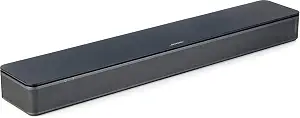
Best for dialogue-focused TV viewing is the guide’s editorial label for the Bose TV Speaker. Its remote control enables a dialogue mode to further enhance speech, or a bass boost for more depth. That makes the controls directly relevant if you want a bar centered on TV listening and would value the option to select between those modes. The label is based on those listed features, not a claim that dialogue will sound clearer for every viewer, program or room.
When you picture the bar in your setup, use its dimensions—2.21″ H x 23.38″ W x 4.02″ D—to check the available space. It has two angled full-range drivers. For TV connection, the listed options include HDMI ARC, Optical in and AUX in, along with Bluetooth version 4.2. The TV can be connected via an optical audio cable, which is included, or an HDMI cable, which is sold separately. Check which connection you plan to use and account for that cable detail as you compare a Black Friday listing.
The speaker can connect up to 3 devices through the HDMI, Optical in and AUX in inputs. If you expect to switch among devices, consider whether those inputs fit your intended arrangement. USB is listed for service only, so do not treat it as a listed everyday audio connection. The bar is also compatible with the Bose Bass Module 500 or 700. Adding one requires the Bose Bass Module Connection Cable or a standard 3.5 millimeter audio cable, sold separately. If that possibility matters to you, include the separate cable requirement in your planning rather than assuming it comes with the speaker.
Choose this option if a compact soundbar, the specified dialogue mode and a straightforward TV connection are closer to your priorities than a listed subwoofer-based system. It is also a sensible comparison point if you want to see whether the connections cover your devices without deciding on an additional bass module now. During Black Friday, verify the exact Bose TV Speaker listing and compare what the offer includes with the cable or accessory needs of your plan. Its Best for dialogue-focused TV viewing label explains why it appears here; it does not imply measured superiority over the other options.
Key specs
Dimensions
2.21″ H x 23.38″ W x 4.02″ D
Drivers
2 angled full-range drivers
Connectivity
Bluetooth version: 4.2 / HDMI ARC (Audio Return Channel) / Optical in / AUX in / USB (for service only)
Device connections
Connect up to 3 devices through the inputs (HDMI, Optical in, and AUX in)
TV setup
via an optical audio cable (included) or an HDMI cable (sold separately)
Remote control
enables a dialogue mode to further enhance speech or add a bass boost for more depth
Bass module compatibility
compatible with the Bose Bass Module 500 or 700 and requires the Bose Bass Module Connection Cable or a standard 3.5 millimeter audio cable, sold separately.
Picture the full setup before the sale
Begin with a practical inventory of your TV area: available space, the connection you expect to use and whether a separate subwoofer fits your room. The soundbars here call for different kinds of planning. The Bose TV Speaker has listed dimensions you can compare with the space near the screen. The TCL S55H pairs its bar with a wireless subwoofer, while the ULTIMEA Poseidon M60 specifies a wired subwoofer. These details affect where you might place components and how you approach connections; they do not establish that one system will suit every room better.
Next, decide how much setup involvement you welcome. A bar with a separate subwoofer calls for thinking beyond the bar’s location, while a compact bar may make a different arrangement more appealing. Do not assume a wireless connection means that a component can be placed anywhere, or that a wired setup will be inconvenient in your particular room. Instead, sketch the positions you would consider and check the product details against your furniture and TV location. For Black Friday, this advance check can help you avoid being distracted by an offer that does not suit the space you have.
Then make a short priority list: the formats you want to consider, whether speech controls matter, which inputs your devices need and whether you want sound adjustments. That list gives each feature a purpose. If you cannot identify a real use for a specification, it may not need to drive your choice. Compare the exact product and variant attached to each Black Friday offer, and consider the whole setup—not just the bar shown in the listing. A good match is the one whose documented components and connections fit your intended use.
Let the connection plan guide your shortlist
Check the TV’s ports before choosing a soundbar, then compare them with the connections specifically listed for each product. The Poseidon M60 lists HDMI eARC, Optical and Bluetooth 5.4. The TCL S55H lists Auxiliary, Bluetooth, HDMI, Optical and USB. The Bose TV Speaker lists HDMI ARC, Optical in and AUX in, as well as Bluetooth version 4.2; its USB connection is identified for service only. These details can help you narrow the shortlist based on your TV and intended devices without assuming that every connection works the same way.
Think about the route from the TV to the bar, not only the names of the ports. For Bose, the listed TV setup uses an included optical audio cable or an HDMI cable sold separately. That distinction matters when comparing the complete purchase you have in mind. If you are considering the Poseidon M60 or TCL, use the listed connection types to check your TV rather than guessing which cable is included or what another device supports. If you rely on Bluetooth, confirm that it fits the way you plan to connect; the presence of Bluetooth alone does not answer every setup question.
Black Friday listings can make it tempting to compare only the headline offer. Instead, match the model name and variant, confirm the connection you intend to use, and account for any separately sold item that is explicitly identified. For Bose, that can mean recognizing that HDMI is sold separately for the described TV setup. Keep the product’s stated connection details beside your TV’s available ports while shopping. If the match is unclear, do not infer missing cable or compatibility details from a product image or a similar listing.
Choose features that match your listening routine
Consider what you watch and how you listen before treating format names as a deciding factor. The TCL S55H lists Dolby Atmos, DTS Virtual:X and Surround Sound, while the ULTIMEA Poseidon M60 is specified as 5.1 channel with Dolby Atmos. The Bose TV Speaker is presented with two angled full-range drivers and a remote that offers dialogue mode or bass boost. These are different feature sets, not a ranked scale. Ask which descriptions connect to your actual routine, and avoid assuming that a format name guarantees a particular result with every source or room.
If you often find yourself wanting to adjust speech or bass, the Bose remote’s two named modes may be especially relevant to compare. If you like experimenting with sound settings, the Poseidon M60’s app lists a 10-band graphic EQ, 121 sound presets and 13 adjustable surround levels. Those controls provide options to consider, but only you can decide whether you would use them or prefer to leave settings alone. The TCL lists AI Sonic Auto Room Calibration; consider that feature on its own terms rather than assuming what adjustment it will make.
Make Black Friday comparisons personal: write down the content you watch, the controls you would reach for and the formats you care about. Then check whether the listed product features answer those needs. A long specification list can look compelling but may not improve the fit for a shopper who wants a simple remote choice. Conversely, a shopper who enjoys exploring sound adjustments may find the Poseidon M60’s listed app controls worth investigating. Choose based on relevant functions, not on a feature count or an unsupported expectation about performance.
Read component and output details in context
A subwoofer can shape the setup decision as much as the bar itself. The Poseidon M60 lists a 5.25-inch wired subwoofer with BassMX Technology, while the TCL S55H lists a wireless subwoofer. The Bose TV Speaker is compatible with the Bose Bass Module 500 or 700, but the required connection cable is sold separately. Those facts provide different planning paths: included subwoofer arrangements on the first two products, and a stated compatibility option for Bose that involves a separately sold cable. Confirm the exact listing details rather than assuming accessories are bundled.
Numbers such as peak power and maximum output can help identify what the product page specifies, but they do not translate on their own into a guaranteed experience in your room. The Poseidon M60 lists up to 300W of peak power, and the TCL S55H lists 220 watts maximum output. Keep those figures in context with the channel description, subwoofer arrangement, formats and controls. If comparing the figures is important to you, use the precise labels as given; do not treat peak power and maximum output as interchangeable measures or use either as a standalone verdict.
For Black Friday, use component details to check the full configuration attached to the offer. Ask whether you are looking at the exact bar and subwoofer arrangement you want, and note any item explicitly described as sold separately. Also think through where the component would sit and whether its connection method fits your room. This is more useful than assuming a larger number or a particular subwoofer connection must be preferable. A specification is a planning clue; your priorities determine whether it matters.
Compare the offer with your own checklist
Before making a Black Friday decision, keep a short checklist beside the listings: exact model, intended TV connection, component arrangement, relevant sound features and any separately sold cable or accessory mentioned in the product details. Compare like with like. The Bose TV Speaker, TCL S55H and ULTIMEA Poseidon M60 have distinct configurations, so a headline offer is not enough to tell you whether two listings represent the same kind of purchase. Confirm the named model and variant rather than relying on a broad category label or a product image.
Next, separate what is known from what you still need to confirm. The supplied product details identify certain formats, dimensions, connections and controls, but do not establish an active discount, current availability or which variant a particular offer contains. Do not treat a Black Friday badge as evidence that the configuration suits your TV. If a listing leaves a decision-critical detail unclear, verify that detail on the product page before purchase rather than filling the gap with an assumption.
Finally, compare the offer against your priorities in order. For someone focused on dialogue controls, the Bose mode is a relevant point to weigh. For someone seeking a wireless subwoofer and listed room calibration, the TCL features are worth checking. For a shopper who wants a specified 5.1-channel system and extensive app controls, the Poseidon M60 may merit closer consideration. These are routes through a decision, not promises or universal rankings. The best Black Friday choice is the exact configuration that meets your own connection, space and listening needs.
Make your Black Friday choice
A useful Black Friday soundbar choice starts with your TV, room and routine—not the urgency of a headline offer. Decide which connection you will use, whether you want a subwoofer, and which formats or controls matter enough to shape your shortlist. Then verify the exact model and variant, including any separately sold cable or accessory mentioned in its details. The Bose, TCL and ULTIMEA options each offer different documented features. Compare those facts with your own checklist, and choose only when the setup makes sense for the way you plan to use it.