An SSD purchase starts with a practical question: where will the drive connect, and what will you ask it to store? These options cover two internal M.2 drives and a portable USB model, with different interfaces and stated speed ceilings. Black Friday can make it tempting to focus on the offer headline, but the model and configuration matter more than a general SSD label. Start by checking your device’s requirements, then decide whether capacity, a particular compatibility note, encryption, or portability deserves priority. The details here can help narrow the choice; they do not establish which current offer is best value.
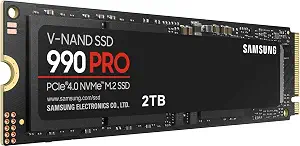
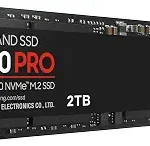
The Samsung SSD 990 PRO 2TB is the Best Overall choice in this guide for shoppers whose priorities center on an internal drive with a clearly stated capacity, M.2 form factor, and desktop, laptop, and PS5 compatibility. That label is an editorial pick among the products here, not a claim that it wins every comparison. Its 2 TB capacity gives you a defined amount of storage to plan around, while the M.2 2280 form factor and PCIE x 4 interface tell you what to check against your computer or console setup before buying.
Samsung lists read and write speeds up to 7450/6900 MB/s. Treat those figures as the product’s stated upper speeds, not a promise that every device or task will reach them. For a shopper moving game files or keeping active projects on an internal drive, the stated speeds offer a useful point of reference, while the capacity and interface help determine whether the drive fits the intended setup. Compatibility is specifically listed for desktop, laptop, and Sony PlayStation 5; confirm your device’s requirements rather than treating that list as universal support for every machine.
Black Friday shoppers considering this model should match the listing to the exact 990 PRO 2TB variant and verify that the offer is for the configuration they intend to install. Compare its stated interface, form factor, capacity, and speed with their own priorities instead of assuming the headline deal makes it the right pick. This guide’s Best Overall label reflects the combination of listed internal-drive details and device support, not a measured ranking. If you need a portable USB drive or specifically want PCIe 5.0, the other products here present different choices. If this model’s listed fit matches your plan, its specifications provide a focused checklist for a purchase decision.
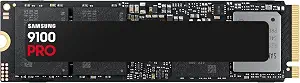
The Samsung SSD 9100 PRO 2TB carries the Best Budget label here, but that is an editorial category choice, not a statement that it has the lowest price or represents a verified Black Friday discount. Its most prominent listed distinction is the PCIe 5.0×4 M.2 2280 interface. That makes the specific interface an important part of the decision: check whether your desktop or laptop calls for this format and connection before treating the drive as a match. Capacity is 2 TB, so you can also compare the stated storage amount with the space you expect to use.
The listing gives sequential read and write speeds up to 14,700/13,400 MB/s. These are stated maximum figures, not guaranteed results for a particular computer or workload. They may help shoppers identify the performance tier described by the listing, but they cannot settle whether the drive will make a meaningful difference for an individual routine. The model also lists hardware encryption and continual drive-health monitoring via Magician Software. Those are relevant considerations if encryption or monitoring belongs on your must-have list; the supplied details do not specify additional software capabilities or explain how either feature works.
For console shoppers, the product information names PS5 compatibility with an added Heatsink device. Keep that condition attached to the compatibility claim when comparing configurations; do not assume an unqualified console fit. Desktop and laptop compatibility are also listed. During Black Friday, compare the exact 9100 PRO 2TB listing and its configuration with the device requirements and the offer you see, rather than using the Best Budget badge as a price promise. The label simply helps distinguish this option in this guide. It may suit someone who prioritizes PCIe 5.0×4 and the stated extras, provided those specifics align with their setup and shopping criteria.
Key specs
Capacity
Digital Storage Capacity 2 TB
Interface
PCIe 5.0×4 M.2 2280
Sequential speeds
up to 14,700/13,400 MB/s¹ sequential read/write speeds.
Compatible devices
Desktop, Laptop, PS5 with added Heatsink device²
Drive health monitoring
Continual monitoring of your drive health via Magician Software
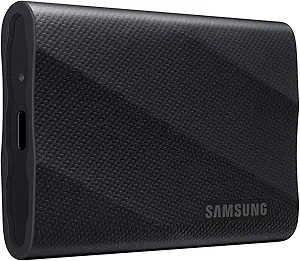
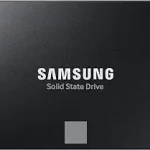
The Samsung T9 Portable SSD 2TB is the Best for Portable Workflows selection because the supplied specifications identify it as a portable SSD and describe a USB interface, rather than an internal M.2 connection. That distinction can help if your routine involves choosing an external drive to move between compatible devices. The listed capacity is 2 TB, and the interface is USB 3.2 Gen 2×2. Check the connection requirements of the device you intend to use; the interface name alone does not confirm how a particular computer or phone will connect or perform.
Samsung lists speed up to 2,000MB/s. As with any stated maximum, use it as a reference from the listing, not a guarantee for every host device, file transfer, or workflow. The product also lists hardware encryption, which may matter if that feature is part of your selection criteria. Its stated dimensions are 3.46″L x 2.36″W x 0.55″Th and its weight is 122 g, useful details for judging whether its listed size and weight suit the way you plan to carry or place it. These figures describe the product; they do not establish durability or handling performance.
A specific phone note may be especially useful to some creators: the listing says it supports iPhone 15 Pro Res 4K at 60fps video. Keep that support statement tied to the named phone and recording format rather than extending it to other devices. For Black Friday, confirm that the offer is for the T9 Portable SSD 2TB and compare its interface, stated phone support, capacity, and size with your workflow. Best for Portable Workflows is an editorial label grounded in its portable format and listed use note, not an assurance that it is the right drive for every mobile setup. If you need an internal upgrade, consider the M.2 products instead.
Key specs
Capacity
Digital Storage Capacity 2 TB
Interface
USB 3.2 Gen 2×2
Speed
up to 2,000MB/s
Encryption
Hardware Encryption
Dimensions
3.46″L x 2.36″W x 0.55″Th
Weight
122 g
iPhone support
Supports iPhone 15 Pro Res 4K at 60fps video
Map the drive to its actual connection
Before comparing Black Friday offers, identify whether the drive will sit inside a computer or connect externally. The 990 PRO and 9100 PRO are both listed as M.2 2280 drives, while the T9 is a portable model with USB 3.2 Gen 2×2. Those are different physical and connection approaches, so a low offer on the wrong type will not solve the intended storage problem. Check your device documentation or existing setup for the drive format and interface it accepts; the product details alone cannot confirm fit for an unlisted machine.
The two internal options also differ in their stated interfaces: the 990 PRO lists PCIE x 4, and the 9100 PRO lists PCIe 5.0×4 M.2 2280. Preserve that distinction when checking requirements. The T9’s USB interface makes it the external-style option in this selection, but do not assume that every host device supports the same connection or transfer capability. Consider where the drive will be used, what connection is available there, and whether you want an internal component or a portable drive. This simple fit check is more useful than choosing based on a broad SSD label or a deal headline.
Use speed claims as a shopping filter
Speed figures can help you sort options, but they do not predict the result of every task. The 990 PRO lists read and write speeds up to 7450/6900 MB/s; the 9100 PRO lists sequential read and write speeds up to 14,700/13,400 MB/s; and the T9 lists speed up to 2,000MB/s. Keep the product’s wording and qualifications in view, especially the 9100 PRO’s explicit sequential-speed description. These stated ceilings are not equivalent to an assurance about a particular computer, connection, or file transfer.
Ask what you expect the drive to do. If your priority is storing or moving files, stated capacity and device fit may matter more to your decision than a top-line speed figure. If you are comparing internal options, check their interface requirements as well as their listed speeds. For the external T9, check the intended host’s connection. On Black Friday, a prominent speed claim can draw attention, but it is only one element of the exact model’s specification. Avoid treating one figure as a complete ranking or assuming the highest listed number automatically creates the best experience for your routine.
Plan capacity around the work you keep
Each product in this selection is listed with 2 TB of capacity, so capacity alone does not separate these three choices. It is still worth thinking through what you plan to store and whether that amount matches your own needs. A desktop library, laptop projects, console storage, or files carried between locations can create different organizational priorities even when the listed capacity is the same. The product records do not establish how much usable space a device will report or how your files will be arranged, so use your own storage habits as the guide.
Capacity should be considered alongside the drive’s intended role. The 990 PRO and 9100 PRO are internal M.2 options; the T9 is portable and lists USB 3.2 Gen 2×2. Think about whether you want storage associated with one computer or an external drive suited to a mobile workflow. Black Friday comparisons are clearer when you hold the capacity constant and then compare connection, compatibility notes, and features that matter to you. Do not let a sale label distract from checking that the exact variant still offers the listed capacity you intended to buy.
Check device-specific notes before choosing
Compatibility details are useful when read narrowly. The 990 PRO lists desktop, laptop, and Sony PlayStation 5 compatibility. The 9100 PRO lists desktop and laptop use, plus PS5 with an added Heatsink device. The T9’s listed phone note is specific to iPhone 15 Pro Res 4K at 60fps video. These statements are not interchangeable: the 9100 PRO’s console condition should remain part of your check, and the T9’s phone support should not be generalized to other phones or recording formats.
If a console or phone is central to your purchase, confirm the exact model and configuration against the requirements for that device before checkout. For a computer, check the supported internal form factor or external connection. A Black Friday offer does not change a product’s stated compatibility conditions, and a familiar product name does not guarantee every variant has identical details. When a listing and your device documentation leave a question unanswered, pause and verify rather than filling the gap with an assumption. A small amount of model-specific checking can prevent choosing a drive for a use the supplied specifications do not establish.
Compare the whole listing, not just the badge
A deal page can foreground a price or a short product title, while your decision depends on the complete variant. Check the model name, capacity, interface, form factor where relevant, and any device-specific condition. For the 9100 PRO, remember the PS5 note about an added Heatsink device. For the T9, make sure the offer is for the portable 2TB model if that is what you want. For the 990 PRO, distinguish its PCIE x 4 connection and M.2 2280 form factor from other SSD configurations.
This matters especially during Black Friday, when shoppers may be comparing several listings quickly. The guide’s Best Overall, Best Budget, and Best for Portable Workflows labels are editorial ways to organize these particular options; they do not promise the lowest price, a discount, or a market-wide ranking. Compare the exact offer and variant, then decide whether its verified details fit your requirements. If a listing does not clearly answer a question that matters to you, do not assume the answer from a similar model. A careful match is more dependable than choosing solely by a badge, headline, or seasonal label.
Make your Black Friday choice
The right SSD here depends on how you plan to connect and use it. Choose between the internal M.2 options and the portable USB T9 first, then weigh capacity, stated speed, compatibility conditions, and listed extras against your needs. Black Friday is a reason to compare the exact offer, not to assume a discount or a perfect fit. Confirm the model and variant before deciding; the specifications provide a useful checklist, while your device requirements determine which option belongs in your setup.