Best Lenovo Tablet Buying Guide — Black Friday Deals 2026
Choosing a Lenovo tablet for Black Friday starts with the way you expect to use its screen, rather than with a sale banner. The listed choices range from an 8.7” display on the Lenovo Tab One to larger 11″ and 12.1″ screens on the Idea Tab models. Memory, storage, operating system and included accessories also differ. This guide explains what those details mean for everyday decisions without assuming a particular offer is worthwhile. When Black Friday listings appear, compare the exact model and configuration, then decide whether its features suit your routine.
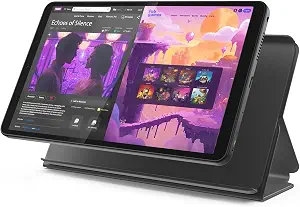
The Lenovo Tab One is the compact-screen choice in this group, with an 8.7” display. That format may suit someone who wants a tablet for reading, casual browsing or viewing a video without making a larger screen the main priority. It is also a straightforward option to consider when choosing a device for a shared household space or for carrying between rooms. Those are use cases to weigh against your preferences, not claims about a particular task being easier or faster on this model.
Its listed hardware includes a MediaTek Helio G85 processor, 4 GB Memory and 64 GB Storage. Those figures give you concrete points to compare with your own intended use. Think about how many apps and files you expect to keep on the device, and whether the storage figure fits that plan. The listed memory and processor are useful distinctions from the two Idea Tab configurations, but the specifications alone do not establish how a given app or workload will perform. If you are comparing Black Friday offers, verify that the listing is for the Lenovo Tab One and that the configuration matches the details you want.
Lenovo lists up to 12.5 hours of unplugged YouTube streaming for this model. Keep the wording in mind when evaluating the figure: it describes YouTube streaming, and “up to” is not a promise of the same result in every situation. The operating system is Android 14, with 2 years of security patches. These are relevant details if you are comparing software and security information across the tablets, so check that the listing you are considering corresponds to this model rather than relying on a general product-family description.
A Folio Case is included, which is a useful bundle detail to consider if you prefer a tablet listing that already names a case in the box. The Best Budget label here is an editorial choice among the three featured products, not a claim about the lowest Black Friday price or a market-wide award. It reflects the Tab One’s role as the smaller-screen option with 64 GB Storage and a listed case. If this model is on your shortlist, compare its actual offer with the larger-screen alternatives and decide whether its display size, storage and stated software details fit your priorities.
Key specs
Display
8.7” display
Processor
MediaTek Helio G85 processor
Memory
4 GB Memory
Storage
64 GB Storage
Battery life
up to 12.5 hours of unplugged YouTube streaming.
Operating system and security
Android 14 operating system and 2 years of security patches.
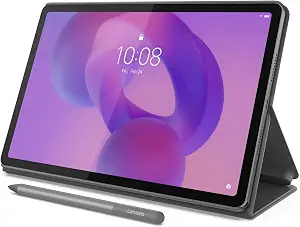
The Lenovo Idea Tab is the Best Overall pick among these three listed options because it brings together an 11″ 2.5K IPS Touchscreen Display – 90Hz, 128 GB Storage and an included Lenovo Tab Pen and Folio Case. That label is an editorial guide to this selection, not the result of comparative testing or a claim that it will suit every buyer. It may be a practical middle choice for someone who wants a larger display than the Tab One’s and more listed storage, while not needing the Idea Tab Plus’s larger screen and 8GB Memory.
The display specification combines its 11″ size, 2.5K IPS touchscreen description and 90Hz refresh rate. Consider whether those are features you value in a tablet screen, and compare them with the specific display details on other models rather than assuming a difference in real-world quality. The processor is a MediaTek Dimensity 6300, and the listed memory is 4 GB Memory. Storage is 128 GB Storage, so shoppers who expect to keep more apps or files on the device can compare that capacity with their own needs. These are decision points, not guarantees about speed, multitasking or how much content will fit for every person.
This model runs Android 15 and is listed with battery life of up to 12 hours. The provided information does not attach a particular usage condition to that battery figure, so treat it as a stated maximum rather than a promise for your routine. The bundled Lenovo Tab Pen and Folio Case may appeal if having both named accessories included matters to you. Before a Black Friday purchase, check that the exact listing identifies the Idea Tab and shows the configuration and accessories you intend to buy; do not assume that another listing with a similar name has the same package.
For a student comparing options for reading, writing or organizing material, the included pen is one point to weigh alongside the display and storage; it does not by itself establish compatibility with any particular app or workflow. For someone choosing a tablet for general household use, the 11″ screen may be a preferred compromise between the compact Tab One and 12.1″ Idea Tab Plus. Check the actual Black Friday offer against those priorities, and choose this model because its stated combination fits—not because the Best Overall label guarantees the best fit for every buyer.
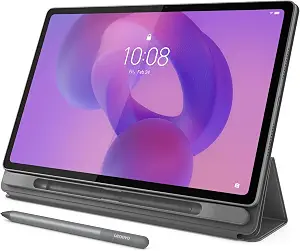
The Lenovo Idea Tab Plus is the Best for a Larger Screen and More Memory choice in this guide. That label points to two clear listed distinctions: a 12.1″ 2.5K IPS Touchscreen Display and 8GB Memory. It is an editorial way to help sort these three products, not a market-wide ranking or evidence of measured superiority. Consider it if you want the largest display among these options or place particular value on the memory figure, while also checking whether its size and other specifications suit your needs.
The screen is listed as a 12.1″ 2.5K IPS Touchscreen Display, with a 90Hz refresh rate. That may be worth considering for activities where you prefer a larger viewing area, such as reading longer material or viewing content, but the listing does not establish a specific visual outcome. Compare the size and stated screen details with the 11″ Idea Tab and 8.7” Tab One in the context of where you plan to use your tablet. A larger screen can be the priority for one shopper and an unnecessary tradeoff for another, so consider your usual viewing environment and handling preferences.
The Idea Tab Plus has a MediaTek Dimensity 6400 processor, 8GB Memory and 128GB Storage. Its listed operating system is Android 15. Use these details to compare configurations, not to predict a particular app’s performance. The memory amount distinguishes it from the two other featured models, while storage matches the Idea Tab’s listed capacity. If you expect to keep many files or use several apps, think separately about memory and storage instead of treating one figure as a substitute for the other. The provided facts do not specify how much space a particular collection of files or apps would take.
Lenovo lists a Lenovo Tab Pen and Folio Case as included accessories, and the tablet’s weight is 1.2 pounds. Those details can help you assess the listed package and whether its stated weight fits your preferences; they do not establish how it will feel for every person or how the accessories work with a particular activity. For Black Friday, verify the exact Idea Tab Plus listing and the included items before comparing the offer with the other models. Choose it when the larger screen and 8GB Memory matter more to you than selecting a smaller-screen option, rather than relying on the label alone.
Key specs
Display
12.1″ 2.5K IPS Touchscreen Display
Refresh rate
90Hz
Processor
MediaTek Dimensity 6400
Memory
8GB Memory
Storage
128GB Storage
Operating system
Android 15
Included accessories
Lenovo Tab Pen, and Folio Case
Weight
1.2 pounds
Make screen size a daily-use decision
The screen is one of the clearest ways to separate these Lenovo tablets. The Tab One lists an 8.7” display, the Idea Tab an 11″ 2.5K IPS touchscreen with a 90Hz refresh rate, and the Idea Tab Plus a 12.1″ 2.5K IPS touchscreen with a 90Hz refresh rate. Start by picturing where you will use the tablet and what you will look at most often. Someone focused on a compact display may favor the Tab One, while someone who wants more screen area may prefer one of the Idea Tab choices. The listed sizes alone do not determine which screen will feel right to you.
The two larger models share several stated screen details, but their sizes differ. If you are choosing between them, consider whether the additional screen area of the Plus is important enough to make it your preferred format. For Black Friday, compare the exact model name and display details in each offer; similar product names are not a substitute for checking the configuration. Avoid letting a promotion headline decide before you have settled on the size you actually want. A suitable screen choice should make sense for your reading, viewing or general tablet routine, whether or not a particular listing is promoted.
Separate storage needs from memory
Memory and storage answer different shopping questions, so compare them as separate specifications. The Tab One lists 4 GB Memory and 64 GB Storage. The Idea Tab lists 4 GB Memory and 128 GB Storage, while the Idea Tab Plus lists 8GB Memory and 128GB Storage. If you expect to save files or install apps, think about the storage figure in relation to what you plan to keep. If you are comparing the configurations, note the memory figure separately rather than assuming that more storage means more memory.
The product details do not say how much space a particular app or collection of files requires, nor do they promise a particular multitasking experience. Use your own needs as the guide: consider the kinds of files you expect to retain and how you typically use a tablet. On Black Friday, read the full listing to make sure that the exact model and configuration match the figures you used for comparison. If a deal page emphasizes one capacity, check the other as well. A careful comparison helps you decide whether the Tab One’s listed storage or either Idea Tab configuration better fits your plans.
Read processor details without guessing at performance
The three listed processors are different: MediaTek Helio G85 on the Tab One, MediaTek Dimensity 6300 on the Idea Tab and MediaTek Dimensity 6400 on the Idea Tab Plus. These names can help distinguish the products and verify that you are looking at the intended model. They do not, on their own, tell you how a particular application will run or establish a real-world speed difference. Avoid choosing solely from processor names if your practical priorities are screen size, storage, included accessories or software.
Think about the tasks you expect to do, then use the processor specification as one comparison point alongside the other facts. If two listings otherwise seem similar, check the full configuration and make sure you are comparing the same model family. During Black Friday, promotional descriptions may foreground a single feature; return to the named processor and the rest of the product details before deciding. This approach keeps a technical label in perspective and helps you select based on the combination of features actually provided, instead of expecting unsupported performance claims from a specification alone.
Compare software, battery wording and the box contents
The Tab One lists Android 14 and 2 years of security patches. Both Idea Tab models list Android 15. These are concrete software details to compare, but the provided information does not describe future update schedules beyond the Tab One’s stated security patches. Check the operating-system details on the exact listing and consider which stated information matters to you. Do not assume that one model has a particular update commitment unless it is included in the product details you are reviewing.
Battery statements also differ in their wording: the Tab One lists up to 12.5 hours of unplugged YouTube streaming, and the Idea Tab lists up to 12 hours. The Idea Tab Plus facts do not provide a battery-life figure. Keep the Tab One’s stated YouTube context and the “up to” qualification intact when comparing it; do not treat these figures as directly measured under identical conditions. Accessories are another practical point: the Tab One includes a Folio Case, while both Idea Tab models list a Lenovo Tab Pen and Folio Case. Check the package details during Black Friday rather than assuming an accessory is included because it appears in another model’s listing.
Use Black Friday to compare the exact listing
A Black Friday offer is useful only if it applies to the Lenovo tablet and configuration you want. Begin with the model name, then verify the specifications that matter most to you: display, processor, memory, storage, operating system and included accessories. Pay particular attention to similarly named models such as Idea Tab and Idea Tab Plus. The provided details show that they differ in screen size, processor and memory, among other points, so a short product title may not be enough to confirm that a listing matches your shortlist.
Compare the offer information shown for the specific item rather than assuming there is a discount, a particular price or a special bundle. No offer amount or current promotion is established here. If a listing highlights an accessory or a specification, confirm it in the detailed product information before completing your decision. Keep your preferred use case in view: a compact display, a mid-size touchscreen, or a larger display with more memory may lead to different choices. Black Friday can be a reason to compare listings, but the model’s fit with your needs should remain the deciding point.
Make your Black Friday choice
For a compact option, the Lenovo Tab One pairs an 8.7” display with 64 GB Storage and an included Folio Case. The Idea Tab offers an 11″ touchscreen, 128 GB Storage, and a pen and case in its listed package. The Idea Tab Plus is the larger-screen choice, with 8GB Memory and a 12.1″ display. Compare those differences with the way you expect to use a tablet, then verify the exact model and configuration shown in any Black Friday offer. Choose the features that suit your routine, not a promotion headline or an editorial label alone.