Best Ssd Hard Drive Buying Guide — Black Friday Deals 2026
Will this SSD sit beside your laptop, replace an internal drive, or become part of a high-performance desktop setup? That practical question is a better place to begin than a Black Friday banner. The three options here cover different roles: a portable USB drive, a 2.5-inch SATA drive, and an M.2 drive using PCIe 5.0. Their capacity and listed features can help narrow the choice, but compatibility depends on the device and installation you have in mind. Use this guide to match a drive to its job, then compare the exact Black Friday listing and configuration rather than assuming every offer refers to the same setup.
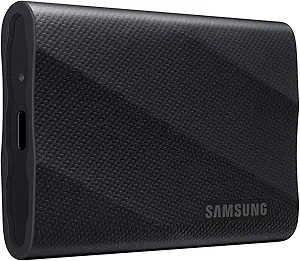
The Samsung T9 Portable SSD is the Best Overall choice in this group for shoppers who want an external drive with a clear travel-and-transfer role. Its USB 3.2 Gen 2×2 interface and stated speeds of up to 2,000MB/s make it the option to consider when files move between compatible devices and the drive needs to remain outside the computer. The speed claim is a listed maximum, not a promise that every device or task will reach it. Check that the equipment you plan to connect can use the interface before treating the headline figure as a deciding factor.
Its 2 TB capacity gives the T9 room for a substantial collection of files, while hardware encryption is a listed feature for shoppers who place importance on drive security. The product information also specifies support for iPhone 15 Pro Res 4K at 60fps video. That detail makes the model worth considering for someone planning that particular phone-video workflow; it should not be generalized to other iPhones, recording modes, or devices. Its dimensions and weight are listed for shoppers who want to check how it will fit into their own carry setup, rather than assuming every portable SSD is equally convenient to carry.
For Black Friday, decide first whether external USB storage is the job you need done. This is not a direct substitute for an internal SATA or M.2 installation: its connection and portable format point to a different role. Compare the exact listing for the T9, verify the capacity and interface shown, and check your intended device’s connection requirements. The Best Overall label is an editorial choice among these featured drives, not a test result or a claim that it suits every buyer. Choose it when portability, listed encryption, and the specified iPhone video support match your plans.
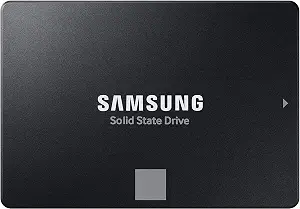
Samsung SSD 870 EVO SATA III 2.5” 2TB (ASIN B08QB93S6R)
The Samsung SSD 870 EVO is the Best for 2.5-inch SATA upgrades choice because its stated format and interface make its intended role explicit. It is a 2.5-inch Serial ATA drive, so it belongs on a shortlist when you are planning an internal upgrade and your computer accepts that kind of drive. Its listed compatible devices include laptop, Mac, and PC, but those broad categories do not confirm that every individual model has the required bay or connection. Check the specific computer and installation requirements before buying.
The drive has a 2 TB capacity, with sequential read speeds listed up to 560 MB/s and sequential write speeds up to 530 MB/s. Those figures give shoppers a concrete starting point for comparing the published claims, but actual results are not guaranteed to match the stated maximums in every setup or task. Consider the work the drive will handle: an internal storage upgrade has different practical requirements from keeping an external drive on hand. Make sure the capacity and 2.5-inch SATA format answer your own need before weighing speed claims.
During Black Friday shopping, treat the Best for 2.5-inch SATA upgrades label as a fit-based recommendation, not a claim about price or universal compatibility. Confirm the exact 870 EVO configuration on the listing and compare it with the drive type specified for your computer. If you want an external portable drive or an M.2 PCIe installation, this model’s stated format points to a different use case. For shoppers who have already identified a compatible 2.5-inch SATA bay, its clearly stated interface and capacity make the relevant comparison more focused.
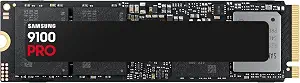
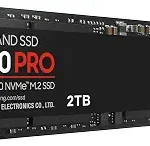
The Samsung SSD 9100 PRO is the Best Budget selection in this article, but that editorial label is not a promise that it will be the lowest-priced listing or that a Black Friday discount is available. Its listed connection is PCIe 5.0×4 in an M.2 2280 format, which makes it a candidate for a system designed for that installation. Confirm the requirements for your particular desktop or laptop before choosing it; an M.2 shape alone is not enough to establish that a drive will suit every computer.
The product information lists sequential read and write speeds up to 14,700/13,400 MB/s, respectively. Treat these as qualified maximum claims and check whether your setup supports the relevant interface before using them to guide a decision. The stated compatible devices are desktop and laptop, as well as PS5 with an added heatsink device. Keep that condition attached to the PS5 compatibility detail when reviewing the listing; do not assume the same setup applies without it. Hardware encryption and continual drive-health monitoring via Magician Software are also listed features.
This drive can make sense for a shopper whose system calls for the specified M.2 interface and who values the listed monitoring feature. It is not the portable USB choice or the 2.5-inch SATA upgrade in this selection. For Black Friday, verify the exact 9100 PRO configuration and any setup condition relevant to your device, including the stated heatsink requirement for PS5 use. The Best Budget label identifies its editorial place among these three products; it does not establish its current price, the size of any offer, or how it compares with products outside this guide.
Key specs
Capacity
Digital Storage Capacity 2 TB
Interface
PCIe 5.0×4 M.2 2280
Sequential speeds
up to 14,700/13,400 MB/s¹ sequential read/write speeds.
Compatible devices
Desktop, Laptop, PS5 with added Heatsink device²
Drive health monitoring
Continual monitoring of your drive health via Magician Software
Encryption
Hardware Encryption
First settle the drive’s place in your setup
Before comparing Black Friday offers, write down where the SSD will live. A portable drive connects externally, while an internal upgrade has to match the computer’s supported installation type. Among these choices, the T9 is the portable USB model; the 870 EVO is a 2.5-inch Serial ATA drive; and the 9100 PRO uses PCIe 5.0×4 in an M.2 2280 format. Those distinctions are more useful than treating every product called an SSD as interchangeable.
Then check the exact device rather than relying on a broad label such as laptop or desktop. The 870 EVO lists laptop, Mac, and PC compatibility, and the 9100 PRO lists desktop and laptop compatibility. Those descriptions do not tell you the fit requirements for every individual machine. The 9100 PRO’s PS5 compatibility is specifically qualified for use with an added heatsink device, so preserve that condition in your decision. The T9’s listed iPhone support is also specific to iPhone 15 Pro Res 4K at 60fps video, not a blanket statement about every phone workflow.
A useful Black Friday shortlist starts with the connection your intended device accepts. If you are unsure, look up the device’s requirements before comparing prices or offer wording. A low-looking offer cannot make an incompatible format suitable, and a product title alone may not show every configuration detail that matters.
Choose capacity from the files you plan to keep
All three featured drives list 2 TB capacity, so capacity does not distinguish these options in this particular selection. Instead, consider what that amount of storage would hold in your routine: a working collection of creative files, an internal computer library, or material you want to carry between places. The right role depends on how you organize and access files, not just the capacity printed on a product page.
Think about whether the drive is meant to supplement the storage you already use or become the destination for a particular collection. An external portable drive can serve a different organizational purpose from an internal installation, even when the listed capacity is the same. Likewise, an M.2 drive belongs in a setup that supports its specified connection and form factor. These choices shape where files live and how you reach them, so decide the role before treating matching capacity figures as a reason to choose one model.
When reviewing a Black Friday listing, confirm that the exact model and capacity shown match the product you intended to compare. Do not assume a banner or search result covers every configuration of a product family. If capacity is the same across your shortlist, shift attention to the interface, installation conditions, and features that genuinely matter to your planned use.
Put published speed claims beside your actual task
The speed details in these listings describe different products and should be read in context. The T9 lists speeds up to 2,000MB/s; the 870 EVO lists sequential read and write speeds up to 560 MB/s and 530 MB/s; and the 9100 PRO lists sequential read and write speeds up to 14,700/13,400 MB/s. These are qualified product claims, not a guarantee of the result you will see with every computer, connection, file, or workload.
Start by asking what kind of work makes speed important to you. Moving files to an external drive, using an internal SATA upgrade, and installing an M.2 drive are distinct situations. Check that your device supports the relevant connection before giving a published speed figure much weight. The task and setup matter: a maximum claim cannot by itself tell you how a particular everyday workflow will feel.
Black Friday can put speed figures beside a prominent offer message, but the number should not replace a compatibility check. Compare claims only when you understand which read or write measure is being described and which exact model is listed. If a speed specification is decisive, confirm its wording on the specific listing rather than assuming a similarly named drive has the same configuration.
Decide which listed extras belong on your shortlist
Once the connection and capacity suit your plan, consider the features that relate to your routine. Hardware encryption is listed for both the T9 and 9100 PRO. The 9100 PRO also lists continual drive-health monitoring via Magician Software. These details may help you identify which product deserves closer consideration, but they do not establish that a feature is necessary for every buyer or explain every aspect of how it works.
The T9’s specified iPhone 15 Pro Res 4K at 60fps video support is another feature to weigh if that is your intended workflow. Keep the wording specific: it does not establish compatibility with other phones or video settings. For the 9100 PRO, note the stated PS5 condition involving an added heatsink device. For the 870 EVO, the relevant detail may instead be its 2.5-inch SATA format, if that is what your upgrade plan requires.
During Black Friday, a longer feature list can attract attention, but it is more useful to separate relevant details from incidental ones. Make a short list of your device, installation type, and any must-have feature. Then check those points against the exact product configuration, rather than treating a feature mentioned for one model as though it applies to the others.
Compare the exact listing, not the event language
A Black Friday label does not tell you whether a particular SSD configuration suits your setup, and this guide does not make claims about live discounts or stock. Compare the exact product name and variant in the listing with the model you selected. Confirm the capacity, connection, and any condition that affects your intended use. This keeps the decision grounded in the item being offered rather than in general event messaging.
Also separate the editorial labels from price claims. Best Overall, Best Budget, and Best for 2.5-inch SATA upgrades are fit-based recommendations among the products in this guide. They are not test results, promises of the lowest price, or market-wide awards. In particular, Best Budget should not be read as evidence that a listing is currently the cheapest option. The actual offer and its configuration need to be checked directly.
If you are comparing more than one listing, verify that each refers to the same model and capacity before weighing the offer details. Read any stated compatibility conditions carefully, especially the 9100 PRO’s added-heatsink condition for PS5 use. A deliberate comparison of the exact item is more dependable than assuming every banner refers to the same configuration.
Make your Black Friday choice
Make the final choice by matching the drive to its job: T9 for a portable USB role and its specified iPhone video support, 870 EVO for a compatible 2.5-inch SATA upgrade, or 9100 PRO for a system built for its M.2 PCIe connection. Before completing a Black Friday purchase, check the exact model, capacity, interface, and any device-specific condition on the listing. Then judge the offer on the configuration you actually intend to use—not on the event label alone.