Best External Ssd Buying Guide — Black Friday Deals 2026
What do you need close at hand: a compact drive for a phone and camera, a straightforward place for everyday files, or more capacity for demanding transfers? That answer is a better starting point than a Black Friday banner. This guide compares three external SSDs by their listed capacity, connection and speed details, portability information, and stated compatibility or security features. The Best Overall and Best Budget labels are editorial choices among these options, not results of comparative testing or promises about current pricing. Before buying, match the exact listing and variant to the device and workflow you have in mind.
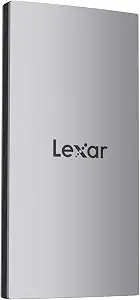
Best Overall is a useful shortlist label for the Lexar ES3 1TB Portable SSD Silver if you want a mix of stated speed, broad listed device compatibility, and compact carry details. Its capacity is 1 TB, and Lexar lists read speeds up to 1050MB/s and write speeds up to 1000MB/s. Those are qualified maximum figures, not a guarantee of the speed you will see with every device. Lexar specifically notes performance may be lower if the system does not support USB 3.2 Gen 2. For a Black Friday purchase, check that qualification against the computer or other equipment you actually plan to use.
The listed compatibility covers iPhone 17 series, Android mobile devices, laptops, cameras, Xbox X|S, PS4, PS5, gaming consoles, and more. One important boundary is explicit: iPhone 14 and older models are not supported. That makes the ES3 worth considering for a household with a mix of the named device types, but you should still confirm the exact device and intended connection before checkout. A Type-C cable is included. For a phone or camera workflow, consider whether that cable and the stated compatibility meet your needs rather than assuming every device in a category will work.
At 42g and 10.5mm thick, the ES3 has clear listed dimensions for someone deciding what to carry alongside everyday gear. It also includes Lexar DataShieldTM 256-bit AES encryption software. That feature may matter if your drive will hold files you want protected; it is distinct from the physical convenience of its weight and thickness. These details explain the Best Overall label as a broad feature-based fit, not a claim that it outperforms every alternative. During Black Friday shopping, compare the exact ES3 variant, included cable, compatibility notes, and encryption-software detail on the listing. Choose it when those particulars fit your devices and the files you expect to keep nearby.
Key specs
Capacity
1 TB
Read and write speeds
up to 1050MB/s read and 1000MB/s write
Speed qualification
Performance may be lower if not supporting USB 3.2 Gen 2 on Mac and other systems
Compatibility
iPhone 17 series (Not supported on iPhone 14 and older models), Android mobile devices, laptops, cameras, Xbox X|S, PS4, PS5, gaming console, and more
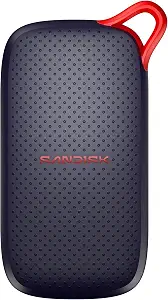
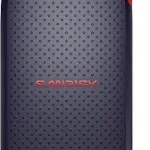
The SANDISK 1TB Portable SSD carries the Best Budget label in this selection, but that editorial designation is not a statement about its current price or a verified discount. Its listed capacity is 1 TB, its interface is USB 3.0, and its read speed is up to 1000 MB/s(2). That combination gives shoppers concrete details to compare when a Black Friday listing catches their eye. The speed is stated as a maximum; check the interface and the precise product variant rather than assuming the figure applies the same way in every setup. No write-speed figure is supplied here, so base your decision on the information shown for the exact listing.
The product listing states drop protection up to 2 meters(3), along with an item weight of 1.12 ounces and dimensions of 1.77″L x 3.35″W x 0.39″Th. Those details can help you judge whether its listed size and protection claim suit the way you plan to carry or store a drive. They do not establish how it will fare in every accident or environment, so treat the wording as a specific product claim rather than a reason to handle it carelessly. If your routine involves moving files between locations, consider both the listed weight and the protection detail.
This option may suit someone seeking 1 TB of external storage who wants a stated USB 3.0 interface and a specific drop-protection claim to weigh in the decision. The supplied information does not identify device compatibility, cable contents, or encryption features, so check the current listing for those points if they matter to your setup; do not infer an answer from a product name alone. For Black Friday, compare the exact SANDISK variant and offer terms with your needs before treating a price label as a reason to buy. Best Budget is a useful starting point within this group, while the right choice still depends on the details you can confirm.
Key specs
Capacity
Digital Storage Capacity 1 TB
Interface
Hard Disk Interface USB 3.0
Read speed
read speeds up to 1000 MB/s(2)
Drop protection
drop protection up to 2 meters(3)
Weight
Item Weight 1.12 ounces
Dimensions
Item Dimensions L x W x Thickness 1.77″L x 3.35″W x 0.39″Th
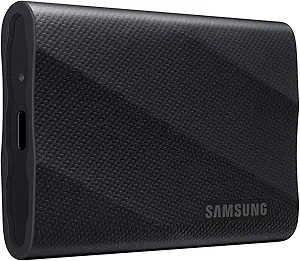
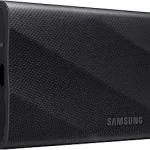
The Samsung T9 Portable SSD 2TB earns the Best for Higher-Capacity Transfers label here because its listed capacity is 2 TB, compared with the 1 TB capacities of the other two drives in this guide. The label describes a fit based on the supplied capacity information; it is not a claim about measured superiority. Samsung lists a USB 3.2 Gen 2×2 interface and speed up to 2,000MB/s. That maximum should be considered together with the connection available on your own equipment. For a Black Friday shortlist, check both details on the exact listing instead of treating a speed figure as independent of the device you will connect.
For users who expect to keep a larger collection of files on one drive or move substantial files between compatible equipment, the 2 TB capacity is a practical distinction to consider. The listing also states hardware encryption. That gives security-minded shoppers a specific feature to evaluate, while the supplied details do not explain setup or use, so consult the product listing if those particulars will affect your decision. Its dimensions are 3.46″L x 2.36″W x 0.55″Th and its weight is 122 g. Use those exact figures to judge whether its physical form suits the way you plan to pack or position a drive.
Samsung states that the T9 supports iPhone 15 Pro Res 4K at 60fps video. If that is your intended workflow, this named support is more useful than a broad assumption about phone compatibility; verify that your specific device and recording plans match the listing. The supplied facts do not establish compatibility with other phones, computers, cameras, or consoles. Compare those details before purchasing, especially if you plan to connect more than one kind of device. The Best for Higher-Capacity Transfers label highlights the 2 TB option, while the interface, speed qualification implied by the connection, hardware encryption, and physical dimensions help complete the decision. Check the exact Black Friday variant rather than relying on a headline.
Key specs
Capacity
Digital Storage Capacity 2 TB
Interface
USB 3.2 Gen 2×2
Speed
up to 2,000MB/s
Encryption
Hardware Encryption
Dimensions
3.46″L x 2.36″W x 0.55″Th
Weight
122 g
iPhone support
Supports iPhone 15 Pro Res 4K at 60fps video
Start with the files you want within reach
Capacity is easiest to judge when you name the material the drive will hold. Think about whether it is a working set of files, media you want to carry between devices, or a larger collection you prefer to keep together. In this selection, the Lexar and SANDISK each list 1 TB, while the Samsung lists 2 TB. That makes the Samsung the higher-capacity choice among these three, but does not automatically make it the right fit: a shopper with a smaller storage need may prefer to weigh its other listed details alongside capacity. Conversely, if keeping more material on one drive is important, the difference is relevant.
For Black Friday, set your capacity preference before browsing offers. Then check that the offer is for the same model and capacity you evaluated; a similar product name can still refer to a different variant. Avoid choosing solely from a promotional headline when the capacity does not suit your file plan. Also leave room in your decision for the connection, device compatibility, and any security or physical details that matter. Capacity describes how much storage is listed, not whether a drive will connect to your equipment or suit a particular workflow. Treat it as one filter in a decision, not a substitute for checking the rest.
Match a speed figure to the connection you own
Speed claims are useful only when read with their qualifications. Lexar lists up to 1050MB/s read and 1000MB/s write, and explicitly warns that performance may be lower if the system does not support USB 3.2 Gen 2. Samsung lists up to 2,000MB/s and a USB 3.2 Gen 2×2 interface. SANDISK lists read speeds up to 1000 MB/s(2) and a USB 3.0 interface. These specifications are not identical kinds of information: the Lexar and SANDISK figures distinguish read speed, while Samsung’s supplied speed detail is stated as a general maximum.
Before a Black Friday purchase, identify the interface details for the exact drive and check the connection information for the device you plan to use. Do not assume that a headline maximum describes every setup or that one listed interface will be available on all your equipment. If your intended use is file transfer, consider whether the drive and device connection meet your priorities; the provided facts do not establish real-world results for a particular system. Compare qualified claims carefully, and treat compatibility and the exact variant as separate checks. This keeps the speed number in context instead of letting it decide the purchase on its own.
Build a device-by-device compatibility check
A storage device can only fit a workflow if the intended equipment is covered, so compare the product’s stated compatibility with your own device list. Lexar names iPhone 17 series, Android mobile devices, laptops, cameras, Xbox X|S, PS4, PS5, gaming consoles, and more, while explicitly excluding iPhone 14 and older models. Samsung specifically states support for iPhone 15 Pro Res 4K at 60fps video. That is a precise use case, not a general statement that every iPhone or recording workflow is supported.
The supplied SANDISK details do not name compatible devices. That is not proof of incompatibility; it means the compatibility information should be confirmed on the exact listing if it matters to you. For Black Friday, write down the device model and what you want to do with the drive, then compare that pair with the product’s stated support. For a multi-device household, check each intended device individually rather than relying on one broad category. The Lexar’s stated Type-C cable is another detail to match to your setup, but do not assume that the cable alone establishes compatibility. Confirm the complete connection and use case before checkout.
Consider carrying, protection, and security separately
Physical details can help you picture how a drive will fit into your routine. Lexar lists a weight of 42g and thickness of 10.5mm. SANDISK lists an item weight of 1.12 ounces and dimensions of 1.77″L x 3.35″W x 0.39″Th. Samsung lists a weight of 122 g and dimensions of 3.46″L x 2.36″W x 0.55″Th. These are the supplied measurements; compare them in their original formats and consider where you expect to keep the drive. A compact-feeling choice for one person may not matter as much to someone who mainly leaves storage in one place.
Protection and encryption are different considerations. SANDISK states drop protection up to 2 meters(3). Lexar lists DataShieldTM 256-bit AES encryption software, and Samsung lists hardware encryption. Those descriptions identify specific features, but they do not establish identical protection methods or setup details. During Black Friday comparisons, ask which concern is most important for your own files and handling habits, then confirm the exact product wording. Do not treat a drop-protection statement as data security, or encryption as physical protection. If any feature is central to your decision, read its description on the listing rather than assuming more than the stated claim.
Use the Black Friday offer as a final fit check
A deal only helps if the listing matches the drive you meant to compare. Check the full product name, capacity, and exact variant before deciding whether an offer is relevant. Then revisit the details that drove your shortlist: the connection and qualified speed information, compatibility for your device, carrying measurements, and any stated protection or encryption feature. These checks apply whether you are considering Lexar for its broad listed compatibility, SANDISK for its USB 3.0 interface and stated drop protection, or Samsung for its 2 TB capacity and named interface.
Do not infer a discount, current availability, or a particular price from a Black Friday label or from this guide. Compare the actual offer presented for the exact item and decide whether it fits your budget and requirements. Look for a clear match between product name, capacity, and the facts that matter to you; if the listing leaves an important question unanswered, seek confirmation before buying. A useful final check is to state your reason for choosing that specific drive in one sentence. If the reason depends on a feature or compatibility claim you cannot verify, pause rather than relying on the promotional framing.
Make your Black Friday choice
Choose by the work the drive needs to do: Lexar brings a broad stated compatibility list, a Type-C cable, and software encryption; SANDISK pairs 1 TB with a USB 3.0 interface and a stated drop-protection claim; Samsung offers 2 TB, hardware encryption, and a named iPhone 15 Pro video use case. Those are different decision points, not a universal ranking. Before completing a Black Friday purchase, check the exact listing and variant, confirm the capacity and connection, match compatibility to your device, and review the physical or security features you value. Let verified fit—not the banner—make the final call.